How To Fix ‘d3dx9_43.dll missing’ Error In Windows 7
November 15, 2010
If you are getting an error that ‘d3dx9_43.dll is missing’ while starting an application in Windows 7 :

Follow the following steps to fix it:
1. Go to Microsoft’s website to get ‘DirectX End-User Runtime Web Installer‘.

Click ‘Download’ to download the ‘dxwebsetup.exe’ file.
2. Execute the downloaded ‘dxwebsetup.exe’ file and it will download and install the optional DirectX components.
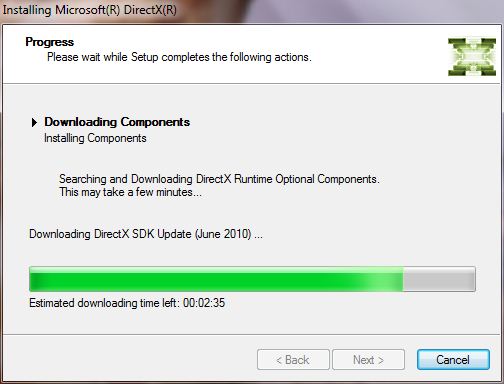


Click ‘Finish’ when done. Try running your application now, the ‘d3dx9_43.dll is missing’ error will not appear again.

How To Locate Area Codes, Time Zones And Internet Suffixes Using Quick Info
Quickly Add Watermarks To PDF Files Using This Free Tool

How To Use Dropbox With Nautilus In Linux Mint / Ubuntu
68 Comments
guyzzz yr my demon tools are not installing my display shows “this format is not supported” than what should i do in this case…?? can any1 knw???
Thank u so much!
This really helped me! 😉
another way to solve this problem:
download d3dx9_43.dll file
http://en.mlfdll.com/d3dx9_43.dll
and put it in game directory or in “c:windowssystem32” folder
another solution is to download d3dx9_43.dll
and replace it in “C:WindowsSystem32” folder
then the error will disappear ..
Saw the same tutorial on another site so tried it but had no luck, but thanks to this one giving a direct link at the top to the DirectX End-User Runtime Web Installer, I managed to do it again, only this time properly, I am now very happy to say I can play Morrowind GOTY even I it refuses to acknowledge my joy-pad’s thumbstick’s existence :L Again, many thanks to the website and finder of the solution 🙂 happy Garion
thaaanks 🙂 ..
it is not showing the error again but the screen goes black for a second and the game is not going to start. please help and the game is resident evil operation raccoon city.
thanks a lot sir..now i can play world of tank!..yes
thank you Sir. it works. now i can play smash cars & skydrift 🙂
im geting ‘cabinet file error ‘in fifa13 directx
while opening in fifa13 im geting ,an error in directx it is not installing and showing error as’cabinet file eror and not trusted’
Ich hab online mehr als vier Stunden gesurft ,aber keinen Artikel gefunden, die so interessant wie deine waren.
Das ist echt super fuer mich!
Admin- my direct x setup runs and says time left is 1hr and so and i waited later it started installing components and then crash and promp a message some cabinet stuff missing ….to play COD 🙁
Re-download the directx setup and make sure to run as administrator.
Hope this helps.
thanks lot its very useful
it really helped to disappear but now my game doesnt starts
the error doesn’t come out anymore but the game doesn’t work 🙁
thanks the dx9x-34 is work
I cannot install the directx components. A pop up box said that ” A cabinet file neccessary for installation cannot be trusted. Please verify the crypthographic services are enable and the cabinet file certificate is valid”…..What is that mean?
Have the Same problem as you..
How can this be fixed, Admin?
Please Help!
Heaps,
Drian
Opps! It works! Thanks a lot XXXXXXXXX
thx it worked with 🙂 -WoT
thanks it works
Thanks a lot. Its work 100%!!!!!!!!
highly recommended!
hai admine i have i problem in the games the witcher 2 assasins of kings wen i clik in the games he tell me isdone.dll not found help
After the installation it said that i may not have been installed correctly and that I could try to reinstall, i did, and this time it said installation failed.
thanks! its very useful. finally i could play Limbo on W7
cheers
-Robert-
it didn’t work, i got an error saying that my cabinet file isn’t trusted or something like that
thanks ! it works ! 😀
thanx to giving the solution for this problem
Thank you very much.
Worked for me too
Worked for me. Thank you very much.
I downloaded the file and when I run it, it gets stuck at the ‘Initializing’ stage.. Then after a while, it comes up with a message saying something about not being able to download the file, try again later.. Please help
The instructions are clear and easy to follow! Thank you!
it works!!!!!!!!!!!!!!!!!!!!!!!!!!!!!!1
goooog. that s goooood!!!!!!!!!!!!!!:D
thank you very much, greatful help!:)
salam,
thank you Allah,
thank you Admin for your great solution
alhamdulillah..thanks for the solution..
OMG! it worked. thank you so very much! you’re a genius!
I installed it, but it did not work… =C and i tried to install the game LIMBO after the Direct X thing… still does not work. i see only a blackscreen when i open the game! please help me with this problem
Actually Limbo is the same reason why i’m here trying to solve this problem. Is it now working??
i came here due to the problem in Limbo. it worked for me, guys..
Hey um, I click run and nothing happens, it just closes itself out and no install thing pops up, what should i do?
Tank you very much i have had the issue with dll’s for a long time and im glad i found this site. i will continue to seek help here if i have a problem…
thank you.. 🙂
hey admin..u r a pro dude…….the guz like u are very helpful
this was the main problem i had and it is all right now
THANK U SOO MUCH 🙂
thanks very much….i really work for game pes 2011
I’d like to say: Thanks A LOT! Your advice was exactly what I needed. I wish there were more people as knowledgable as you are, Admin.
All the best!
Alex
Thanxxx a lot…..4 ur solution……
This still didn’t work, it said that it couldn’t be installed due to directx or something
Hi Kati,
Can you post the exact error?
Regards,
admins
i hope it work
Can you download the updates without the web installer?
Dear Gordon,
You can download the latest standalone DirectX setup instead – http://www.microsoft.com/download/en/details.aspx?displaylang=en&id=8109
Regards,
admins
Thank you very much for providing clear and easy-to-follow instructions for this problem!
Sincerely,
Miles 🙂
Hi dear admin
I,ve install direct x 10 but stuill i have an error with this subject: ” d3dx9_43.dll was not found reinstall to fix problem”
I,v install a game. tanks a lot for your answering.
Hi psbsp,
Try reinstalling the game after directx reinstallation.
Regards,
admins
why I can not download ‘DirectX End-User Runtime Web Installer‘ from Microsoft’s website?
Hi Marko,
We are able to download it. Please try again.
Regards,
admins
because you cant!
Yes you can – http://www.microsoft.com/download/en/details.aspx?id=35
If you have a pirated version of Windows that could be why.
thanks a lot
it works after very hard search
thank u so much.it works
While I instal it dont show me d3dx9_43.dll error but still can’t open PES 11
yhanks it really works
it removed the thing is missing but now the game just like immediantly screws up and makes your mouse dissapear and then u needa go to task manager to get it working
Thanks a lot buddy. worked perfectly as u mentioned. KUDOS for u 🙂