How To Install And Use Furius ISO Mount In Linux Mint
Furius ISO Mount is a an easy to use tool for Linux users which can be used to mount / burn ISO, IMG, BIN, MDF and NRG disk images. Here’s how to install and use this useful utility in Linux Mint / Ubuntu-
1. Issue the following command at the terminal:
sudo-apt get install furiusisomount

Enter ‘y’ to confirm the installation.

2. After the installation is complete, click ‘Menu>Accessories>Furius ISO Mount’.

3. The application will start. Click on ‘Browse’.

4. Navigate and select the disk image you want to mount / burn. Click ‘Open’.

5. Click ‘Mount’ to mount the image. (You can click ‘Burn’ if you want to burn the image to a CD/DVD)

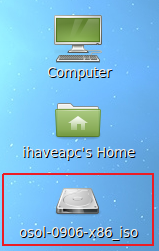
6. Now, you can access the mounted image from your desktop.
7. In order to unmount the image, select the image in the list of ‘Mounted Images’ and click ‘Unmount’.