Quickly Find Out Calendar For Any Year Or Month Using Terminal In Linux Mint/Ubuntu
July 23, 2011
Here is a super quick way to find out all the dates of any specific month and a specific year by using a single Terminal command.
1. Open Terminal and type (say you need to see all the dates for December of this year) :
[cc lang=”bash”]
cal -m dec
[/cc]

For seeing it for any specific year, simply add the year to the above command :
[cc lang=”bash”]
cal -m dec 2012
[/cc]

This shows the days and dates for month of December 2012.
You can use the cal command to list a whole monthly calendar for any year all through the Terminal.
[cc lang=”bash”]
cal 2011
[/cc]
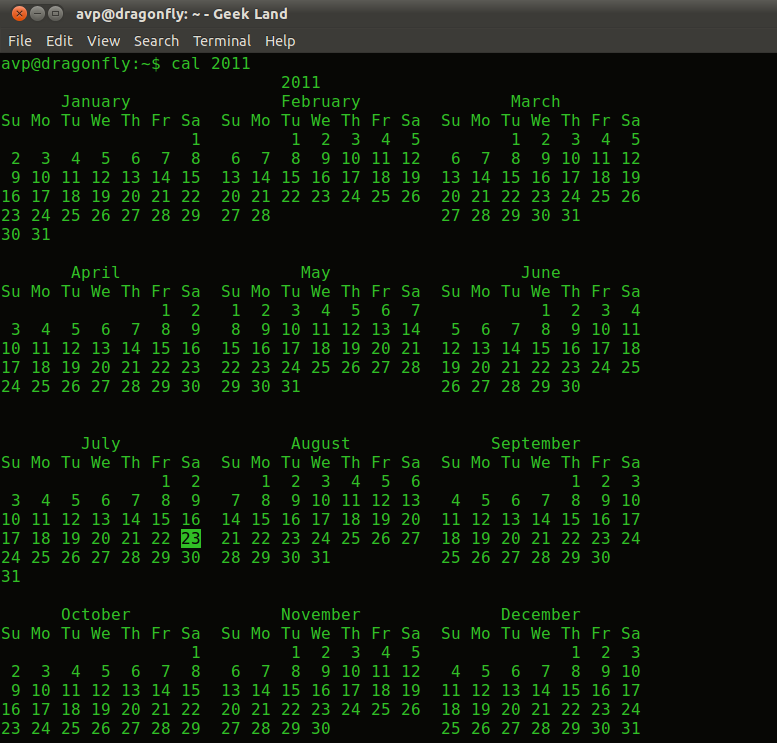
Quicker and geekier then to click Date/Time and navigate to specific dates and days, isn’t it ? 🙂