How To Always Open Windows Command Prompt With Administrator Privileges
February 4, 2012
It can be annoying to always select the “Run as administrator” option when using the Windows command prompt to perform administrative tasks.
Here is how to always launch the Windows command prompt with administrator privileges :
1. Select All Programs > Accessories > Command Prompt and right click. Then select “Properties”.
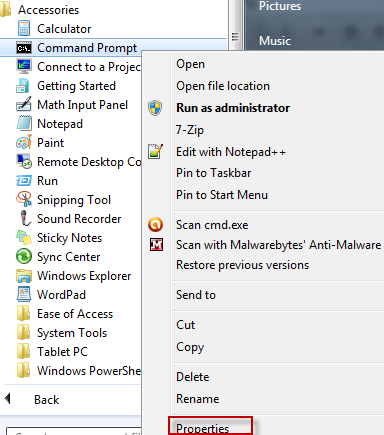
2. Click on Shortcut tab and select Advanced.

3. Mark the option “Run as administrator” and hit Ok.

All done.
From now on, the command prompt will always open with administrator privileges so that wonderful geeky things can be performed. 🙂


