How To Quickly Flush DNS Cache Using Mozilla Firefox
April 26, 2013
DNS cache is a record of mapping website addresses to their IP addresses so that after visiting them for the first time, subsequent look-ups become quicker as these records are stored locally.
However, after a while stale DNS cache can cause browsing issues and clearing this DNS cache can fix them quickly. DNS Cache is a simple Firefox add-on that does just that.
1. Download and install it from here.

2. After installing, the gears icon for this add-on will show up in the bottom right corner of Mozilla Firefox.

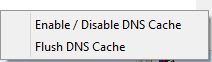
3. Using it is simple, to clear the DNS cache, simply right click on this gear icon and select “Flush DNS cache”. To disable the add-on, select “Enable/Disable DNS cache”.
Simple and efficient.