How To Setup Strict Message Filtering In Facebook
October 14, 2013
The default message filtering in Facebook is set to “Basic”. This means that messages sent to you by those whom you don’t know often show up in your Messages inbox.
Here is how to setup strict filtering so that only messages sent by friends and close acquaintances show up in “Messages” while rest go to “Other” inbox :
Login to Facebook account and select the gear icon, then select “Privacy settings”.

Under the section “Who can contact me”, enable the option “Strict Filtering”.
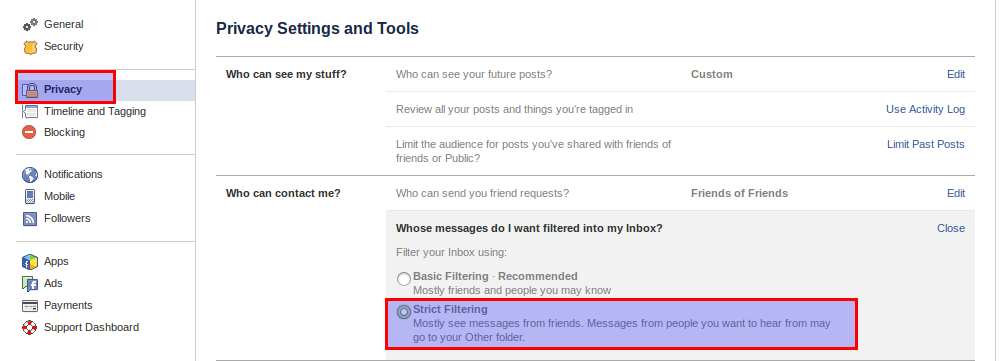
This will now for most part filter messages and you’ll see those messages (mostly from unknown / not close acquaintances) in “Other” inbox rather then directly in “Message” inbox.
Happy Facebook-ing.
Related Posts

How To Turn Off Tab Preview In Opera
How To Manage Privacy When Posting Facebook Updates
