Use Easy Copy In Firefox To Copy Web Page Details With A Click
Easy Copy is an awesome Firefox add-on that makes copying everything from web pages simple.
 Download and install it from here.
Once installed, the easy Copy menu will pop up when right clicking on any web page. Suppose only title from a web page needs to be copied. Choosing Easy Copy > Title does that.
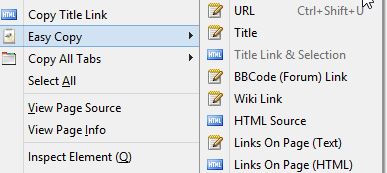
So rather than scrolling back and forth and selecting the title text, Easy Copy can do this with just a click once Title is selected as above. The web links from web pages can either be copied in text or HTML format.
The same goes for other sections of a web page like hyperlinks, BB code (for forums) and so on. Besides that, all of these features are not related to a single web page. They can be copied even from all the open tabs  by choosing “Copy All Tabs”.
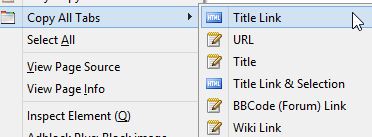
All of these elements can then be directly copied to a text editor if needed. So for the above example, when only web links are chosen to be copied from within a single web page, copying it into notepad will look something like below :

For copying web page title link of all the open tabs, the copied elements will something like below in notepad :
 This is an extremely useful add-on that makes working with web pages more productive.
Do give it a try.