How To Update Linux Mint In Few Easy Steps
June 26, 2010
1. Make sure you are online. Click on ‘Menu>Terminal’.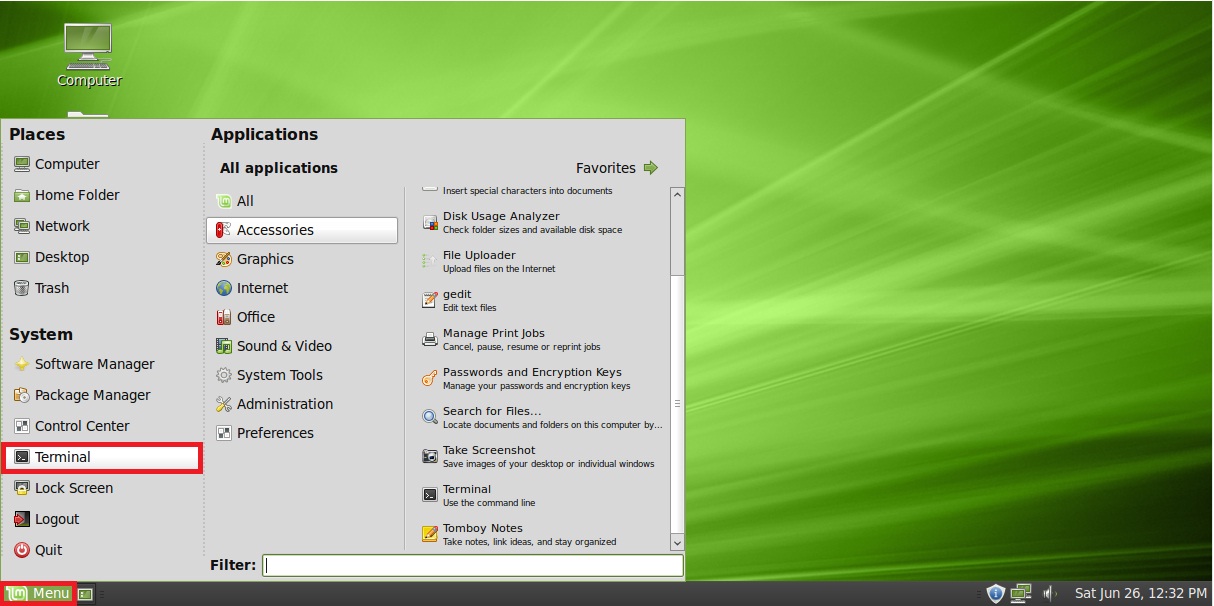
2. Issue the following command in the terminal: sudo apt-get update Enter your user password when prompted.
3. The system will check online repositories for new versions of the system files as well as all the installed applications.
4. When done, issue the following command in the terminal: sudo apt-get upgrade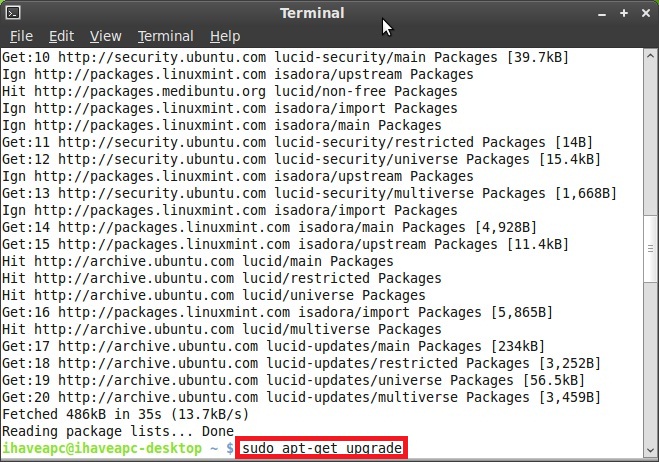
5. The system will display a list of packages to be upgraded and will ask for user confirmation. Answer ‘y’ to continue.
6. Now sit back and relax as system downloads and upgrades the packages. Close the terminal when done.
The above two commands can be used to update Ubuntu Linux or any Debian Linux based distribution.
sudo vs su in Linux: Explained
How To Install Terminator From Command Line In Manjaro Linux
Nostalgic Journey: Exploring the Internet’s Roots with BBS and Unix
7 Comments
Well, finding good information on computer programs ( laptop computers, computer software and spyware) is not always common. But the information here about Mixed Bag Of Tech Blogging And Geek Humor is enough. I see now what has been cooking in your head.Keep up.
This site is a walk-through for all the information you wanted about this and didn’t know who to ask. Look here, and you’ll definitely find it.
Glad you liked it.
Hey man, was just browsing through the internet looking for some information and came across your blog. I am impressed by the information that you have on this blog. It shows how well you understand this subject. Bookmarked this page, will come back for more. You, my friend, ROCK!!!
@ Marina : Thanks for the visit 🙂
Great article, hey I stumbled on to this post while surfing for lyric updates. Thanks for sharing I’ll tell my friends about this too.
@ you and i lyrics : Thanks for dropping by.