How To Add A New Shortcut To The Unity Dock In Ubuntu 11.10 Oneiric Ocelot
October 26, 2011
Here’s how to add a new shortcut to the Unity dock in Ubuntu 11.10 Oneiric Ocelot:
1. Type in the name of the desired application in the Unity dash.
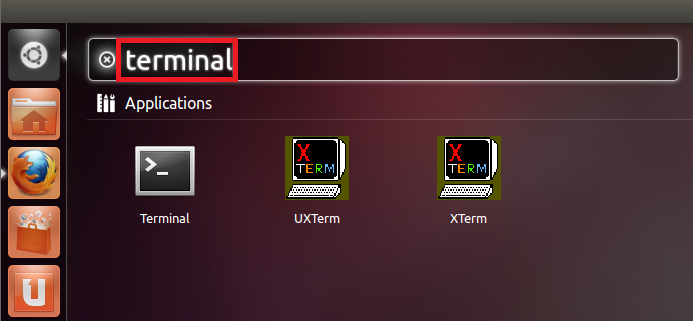
2. Drag and drop icon of the desired application onto the Unity dock.


3. Drag the newly created shortcut to any desired position on the Unity dock.

Project N.O.M.A.D.: Your Ultimate Offline Survival Computer

How To Install Restricted Extras In Ubuntu 12.04 LTS ‘Precise Pangolin’
How To Rotate / Resize Image With A Right Click In Linux Mint
2 Comments
The described way of adding entries is quite obvious. What would be more helpful is a description of how to add entries which cannot be found by keying in the name into the dash. When you install programs beyond those from the standard repositories, e. g. if you compile them yourself or when you install LibreOffice 4 in the version from libreoffice.org getting another program called soffice, but in /opt/…, then these cannot be found by the dash.
Typing the first few letters of the program name after dash and hitting Tab lists out all related entries. Same for commands too.