Change Display Settings Of Favorited Sites In Internet Explorer Bookmarks Bar
January 19, 2015
If there are a lot of bookmarks in the Internet Explorer bookmark bar, it can get cluttered to access them.

However, the display option for these bookmarks can be changed. By default, all the favorited sites visible in the bookmark bar are shown with their long titles.
This can be changed to either a short title or even icons.
Here is how :
Right click on any one of the favorited sites from bookmark bar and choose “Customise title widths”.
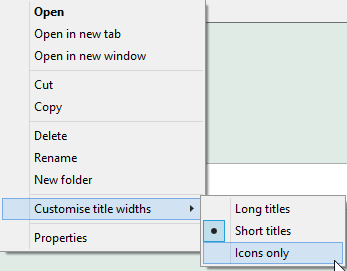
From the existing options, either choose  “Short titles” or “Icons only”.
The bookmarked sites will either be with their short titles format :

Or with just their icons :

Happy bookmarking!