iSkySoft PDF Editor Pro for Mac and PC can create, edit, convert and merge PDF documents all through a few clicks.
Some of the key features are :
- Edit PDF documents just like regular text documents (add images, text, hyperlinks and so on).
- Fill out PDF forms and make new forms using existing templates.
- Convert PDF to Word, Excel, PPT, text formats.
- OCR (Optical Character Recognition) feature to scan existing PDF pages/documents.
- Create stamps and personalized signatures to PDF documents.
- Merge multiple PDF documents into a single document.
Using it is easy (the process here is shown of the Mac version, the Windows version is also very similar). Simply launch the tool and the main interface will offer choices about PDF functions.

Editing PDF files :
There are different editing functions like inserting/adding pages, editing text and adding/editing hyperlinks to name a few. Let’s take a look at the most commonly used features.
To insert pages :
First, open the PDF source file where pages are to be added. Either through Open File or File tab.
Next, click on Insert Pages and select the pages or entire document that needs to be added.

Editing text in PDF documents :
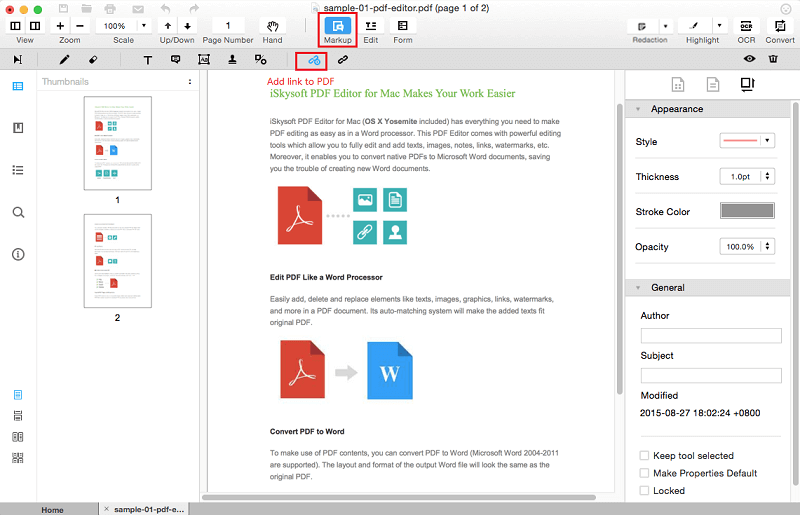
Various text attributes like fonts, colors, appearance etc can be changed using the editor. To add text, hit the Add Text button and then click where it needs to be inserted. Clicking on Markup will bring up various annotation tools for further editing.

Similarly, pages can be edited by adding watermark, header and footer, setting a password and so on. These functions are listed on right pane of the editor and can be used as needed.

The OCR feature can scan images and pages from existing PDF files and edit them.

Conversion to other formats : To convert an existing PDF document to any of the other widely used formats like MS Word, Excel, PowerPoint, text or even web formats like .html, first choose Convert PDF and then after adding the source file, select any of the available output formats listed from the drop-down menu. To begin the process, click on Convert.
-
 Adding hyperlinks : Text in existing PDF documents can be edited so as to include hyperlinks. Adding them is simple. Click on Markup > Add Links to PDF File.
 Next, add the link the text should point to.

Editing and Creating PDF Forms : To fill up an existing PDF form, open it in the editor and click on Edit. This will make the various text fields editable and information can then be added to each of them.

To create a new PDF form, click on Form tab and choose accordingly.

Merging PDFs : Multiple PDF documents can be merged into a single file. This can be useful when a consolidated report/file needs to be created. To do this, click on Combine Files from the editor interface. Then add the source files which need to be merged.
Finally, hit Combine to begin the merging process.

Also, for each of the source PDF files, either all pages or even/odd can be selected for merging.

Removing PDF Password : PDF files with password can be made accessible by simply converting them to any other format using the editor.
Overall, iSkySoft PDF Editor Pro has a simple and and easy to use interface for processing PDF related functions.
Do give it a try.