Dark Patterns in Apps 101: Do Not Fall for Them
Ever felt like an app or website was nudging you into doing something you didn’t really want to do? Like signing up for a subscription you can’t easily cancel, or accidentally buying extra items at checkout?
Then you have likely encountered dark patterns.
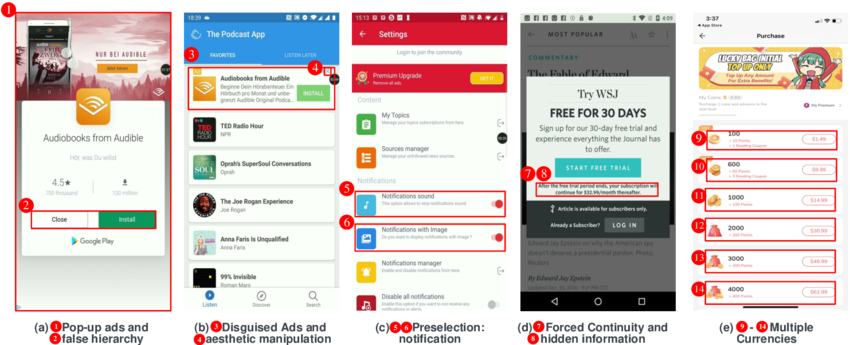
[Image courtesy: Researchgate]
What are Dark Patterns?
In simple terms, dark patterns are sneaky design tricks used in apps and websites to manipulate you into taking actions that benefit the company, often at your expense. They exploit our natural tendencies and mental shortcuts to get us to click, buy, or share more than we intended.

[Image courtesy:Adapty]
Think of them as the digital equivalent of a magician’s sleight of hand: they distract you from what’s really happening.
These designs are intentionally confusing, misleading, or even guilt-tripping, all with the goal of monetizing your attention and increasing your engagement, even if it’s not in your best interest.
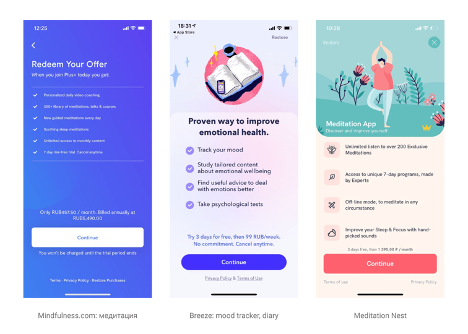
[Image courtesy: Adapty]
Common Types of Dark Patterns and How They Work:
- Hidden Costs: You get to the end of your online shopping cart, only to find unexpected fees (like service charges or processing fees) added at the very last step.
- Forced Continuity: You sign up for a free trial that requires your credit card details, and then the service automatically charges you once the trial ends, making it incredibly difficult to cancel.
- Confirmshaming: An option to decline something is worded in a way that makes you feel bad or guilty for saying no. For example, a pop-up might say, No thanks, I don’t want to save money, if you try to refuse a discount.
- Roach Motel: It’s super easy to get into something (like signing up for a newsletter or a service) but incredibly hard to get out of it. Finding the Unsubscribe or Cancel button feels like a treasure hunt.
- Preselection: Checkboxes for things like email newsletters, data sharing, or extra add-ons are already ticked by default, hoping you won’t notice and just click Accept.
- Bait and Switch: You click on something expecting one outcome (e.g., a free download button), but you get something entirely different, like an ad or a subscription prompt.
- False Urgency/Scarcity: Messages like Only 3 left in stock! or Offer expires in 5 minutes! create a false sense of urgency to push you into making a hasty decision.
- Privacy Zuckering: You’re tricked into sharing more personal information than you intended, often through vague wording or confusing privacy settings.
- Disguised Ads: Advertisements are made to look like regular content, making you click on them accidentally.
How to Guard Against Dark Patterns:
The good news is that by being aware, you can protect yourself from these manipulative tactics. Here’s how:
- Read Carefully, Don’t Skim: This is the golden rule. Before clicking I Agree/Accept All, or any prominent button, take a moment to read the text around it, especially the smaller print.
- Look for the Fine Print or Manage Settings: Many dark patterns rely on you choosing the easy, prominent option. Always look for alternative, less obvious options like Customize, Advanced Settings, or Manage Preferences, especially for cookie banners and privacy settings.
- Be Suspicious of Free Offers: If something is free, be extra cautious, especially if it asks for your credit card details. Understand the terms of the trial and set reminders to cancel if you don’t want to continue.
- Question Urgency and Scarcity Claims: Don’t let limited time or low stock messages rush you. Take a breath and evaluate if you truly need the item or service. These claims are often artificial.
- Look for Easy Exits: Before committing, try to find the cancellation or opt-out process. If it’s hidden or requires many steps, it’s a red flag.
- Be Wary of Pre-Checked Boxes: Always uncheck any pre-selected options you don’t want, whether it’s for newsletters, extra items, or data sharing.
- Understand What You’re Consenting To: When asked for permissions (like access to your contacts, location, or camera), understand why the app needs it and if it’s truly necessary for the app’s function.
- Use Reputable Sources: Stick to well-known and trusted apps and websites when possible. While even large companies can use dark patterns, smaller, less reputable ones might be more aggressive.
- Report Dark Patterns: If you encounter a particularly shocking dark pattern, consider reporting it to consumer protection agencies or privacy organizations in your country. Your feedback can help drive change.
By developing a critical eye and taking a moment before you click, you can protect yourself against these deceptive designs and take back control of your online experience.
Stay vigilant, stay informed, and don’t let dark patterns trick you!
Meet WolframAlpha
How To Enable Offline Mode For Google Docs