How to Auto-Remove Image Metadata in Proton Mail
Image metadata is simply data about a digital image. It’s the information that’s embedded within the image file itself, but isn’t part of the picture you see on the screen. Think of it as a digital label or a description tag for a photo.
This hidden data can tell you a lot about the image, including:
- Technical details: This is automatically added by your camera or phone. It includes the camera model, lens type, shutter speed, aperture, ISO, and whether the flash was used.
- Location information: If your device has GPS enabled, the metadata can include the exact geographical coordinates of where the picture was taken.
- Date and time: It records the precise date and time the image was captured.
- Descriptive information: You can manually add this yourself. This includes elements such as the image title, keywords (e.g., sunset, beach, vacation), a caption, and the photographer’s name.
- Copyright information: This includes the owner of the image and any applicable usage rights or restrictions.
As this can give out a lot of information, it is better to remove metadata, especially when emailing.
Proton Mail Metadata Settings
So for a privacy-conscious email service like Proton Mail, there is an option to auto-remove the image metadata before sending messages.
Here is how to enable it:
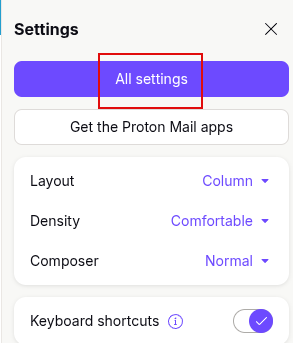
Log in to Proton Mail and click the gear icon. Click on All settings.

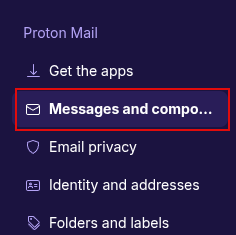
In the left pane, scroll down to the Messages and composing section under Proton Mail.
Then, in the right pane, scroll down to the Composing section. This is where the option to remove metadata is available.
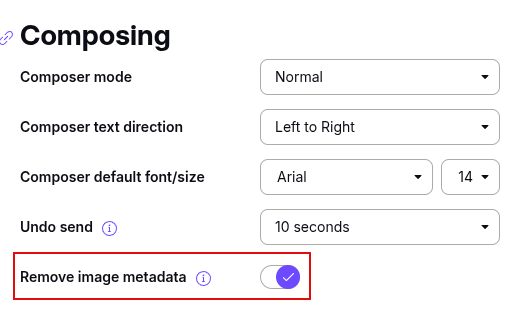
So enable the slider next to Remove image metadata.
Proton Mail will automatically save these changes. So, from now on, when you include images in messages for sending, their metadata will be removed.
There are other useful privacy features too which you can try out.
Happy emailing.

How To Quickly Identify Bandwidth Hogging Users / Applications In Linux Mint / Ubuntu

How To Change Firefox Update Settings To Stop Downloading Updates Automatically