How to Setup Vacation Responder in Gmail
The Vacation responder in Gmail is a handy feature that automatically replies to emails when you are away and unable to check your inbox regularly such as during a holiday, business trip, or personal leave.
You can choose whether the autoreply is sent to everyone who emails you, or only to people in your contacts list (helpful if you don’t want strangers or spam to trigger a response).
Benefits of using the Vacation responder:
- Automatic replies: Sends your set message without you needing to manually respond.
- Custom date range: You can schedule when the responder starts and stops.
- Personalized message: Include details like when you’ll return, alternative contact info, or who to reach in your absence.
- Contact-based restriction: Option to limit responses to only people in your contacts.
- Once-per-sender rule: Gmail sends the autoreply once to each person (unless the same person emails you again after 4 days).
Here’s how to enable and customize it for Gmail web:
Login to Gmail and click the gear icon. Choose See all settings.
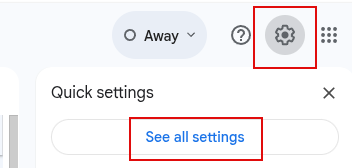
Go to General tab and scroll down to the Vacation responder section.
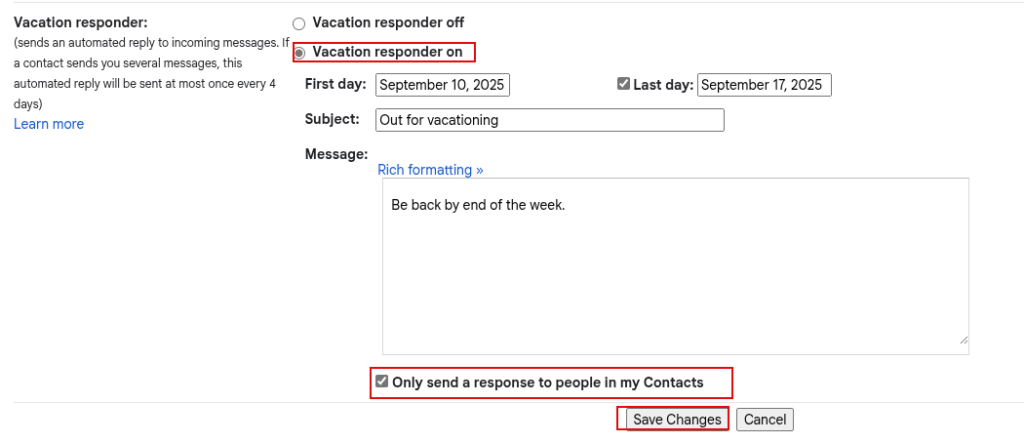
Select Vacation responder on.
Choose a start date and (optional) end date. If you don’t pick an end date, it stays on until you turn it off manually. Write your message in the message box. (You can also include your alternate contact info in case of emergencies.)
Check the box Only send a response to people in my Contacts if you don’t want strangers/spam to get replies.
Click the Save Changes button at the bottom.
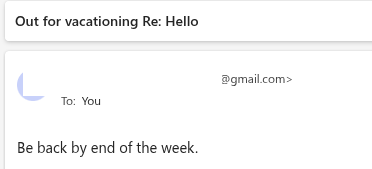
When enabled, Gmail automatically sends a pre-written reply to anyone who emails you during the set vacation time.
Turning it Off Early

If you come back before the end date, you’ll see a banner at the top of Gmail saying, Vacation responder is on. Click End now to stop it immediately.
Happy emailing.

Auto Play HD YouTube Videos In Fullscreen

The New Microsoft Edge Browser: First Impressions