How to Use the Eyedropper Tool in Firefox
If you’ve ever seen a color on a website and wished you could grab it instantly, Firefox has you covered. The browser includes a handy Eyedropper tool that lets you pick colors directly from any page and copy their exact hex code.
So, whether you’re a designer, developer, or just someone who wants to match a color for a project, this tool makes it easy to figure out the exact hex codes for different colors.

Some Common Hex Codes for Colors
What is the Eyedropper Tool?
The Eyedropper tool in Firefox works like a digital color picker:
- It lets you hover over any part of a webpage and see the hex color code.
- The color is shown in hex format (like #4285F4) and can also be copied in RGB format.
- Clicking once copies the color to your clipboard, ready to paste into design apps, CSS files, or documents.
How to Use the Eyedropper
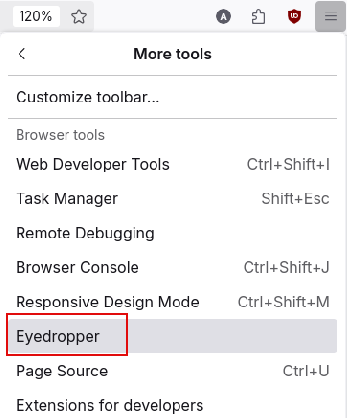
Open Firefox and click the menu button (three horizontal lines in the top-right corner). Select More tools.

From the tools list, click on Eyedropper.
Now hover your mouse over the webpage. The pointer will be turned into a magnifier with crosshair. This magnified preview will show the color (hex values) under the pointer.
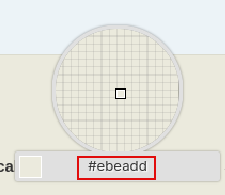
The hex values change depending on the colors on the webpage.
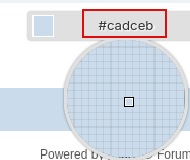
Once you find the color you want, press left click. The hex color code is instantly copied to your clipboard. You can then paste it into a CSS file for styling your website, a design program like Photoshop, Figma, or Canva or in your notes or documents for reference.
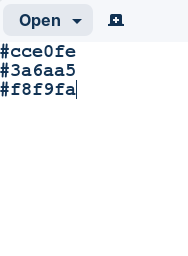
To stop using Eyedropper, press the Esc key. The mouse pointer will now turn back to the regular one.
Use Cases for the Eyedropper
- Web Design & Development: Quickly grab exact brand colors to style elements in CSS.
- Graphic Design: Match colors from websites to keep branding consistent in graphics.
- Accessibility Checks: Verify contrast between text and background colors for readability.
- Personal Projects: Save a nice shade you spotted for a presentation, poster, or art project.
To sum it up, the Eyedropper in Firefox is a small but powerful tool that saves time and effort. Instead of guessing colors, you can grab the exact color in hex format you see online in just a click. So, if you often work with colors, this tool is a must-know.
Happy designing.

Free Giveaway : Wondershare DVD Slideshow Builder

Quickly Insert GIFs In Emails With This Chrome Add-on

This step-by-step guide on Firefox’s Eyedropper is super helpful for grabbing exact web colors instantly—for anyone who needs extra color tools like converters or palettes, mytoolhub offers a bunch of free online options too.
free online tool mytoolhub