How to Toggle Hot Corner and Active Screen Edges in Ubuntu 24.04 LTS
The Hot Corner feature in Ubuntu 24.04 LTS is a shortcut to open the Activities Overview screen by touching/clicking the top-left corner of the screen.
Another feature is the Active Screen Edges that lets you resize open windows by dragging them against the top, left and right screen edges to adjust their sizing and helping you view them side by side. It is a simple way to enhance multitasking on Ubuntu. Whether you choose to expand their functionality with an extension or disable them for a cleaner workflow, the feature gives you more control over how your desktop responds to your movements.
Here is how to toggle both these features:
Click the Show Apps button and select Settings from the dropdown.


In the left sidebar of the Settings window, click on Multitasking.
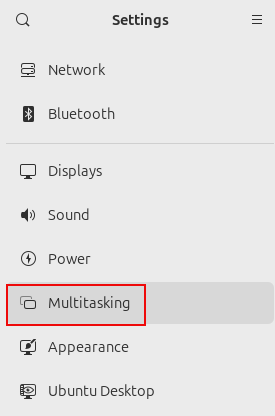
On the right side, under the General section you will see the settings for Hot Corner and Active Screen Edges.
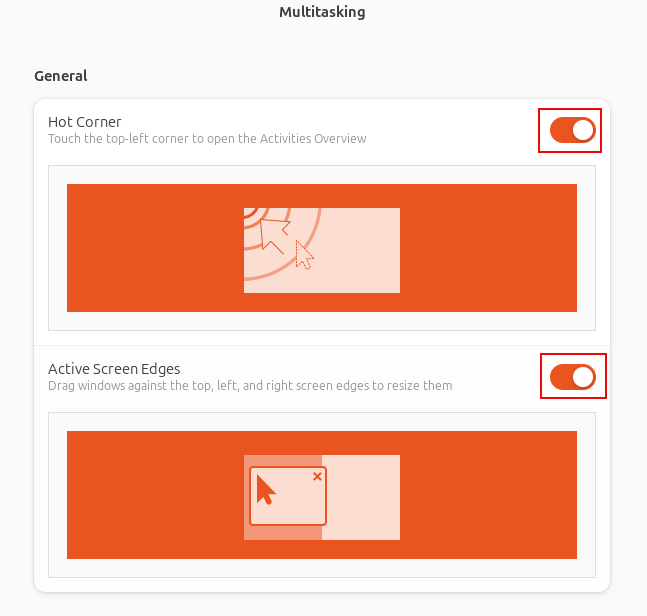
Toggle them on and off as needed.
All done.

Quickly Get Detailed Battery Usage Details In Linux Mint

How To Change Location Of User Folders In Lubuntu 18.10
