Quickly Close Tabs in Vivaldi Browser With a Double-Click
Vivaldi is a powerful and highly customizable web browser designed for people who like to browse their own way. Created by the team behind the original Opera browser, Vivaldi focuses on giving users control. You can change how it looks, how it works, and even how you manage your tabs. It’s fast, private, and packed with smart tools that make everyday browsing smoother and more efficient.
What really makes Vivaldi stand out is its tab management. If you often have lots of tabs open, you’ll appreciate how easy it is to stay organized. You can group tabs into stacks, arrange them in a split-screen view, or even move them to the side or bottom of the screen.
Vivaldi also lets you hibernate unused tabs to save memory, automatically reload tabs on a timer, and save entire sessions to revisit later. Besides these advanced tab features, you can also directly close open tabs in Vivaldi by double-clicking them.
Here is how:
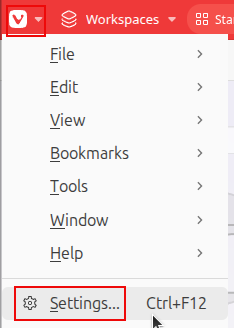
Open Vivaldi settings by clicking the logo and choosing Settings. (Shortcut keys: Ctrl+F12).
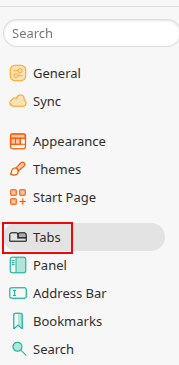
Then, from the left pane, click on the Tabs settings.
From the Tab Handling section, select the option Double-Click to Close Tab.
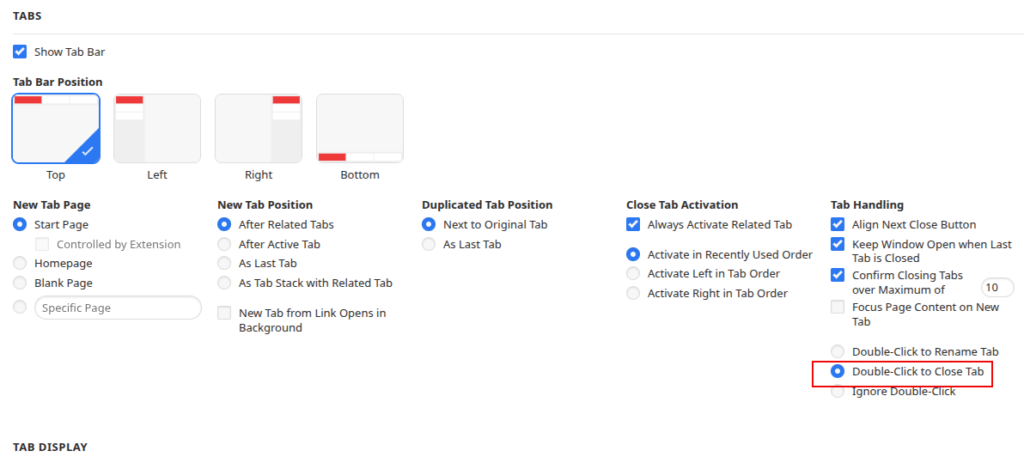
You can also adjust other tab settings from here like displaying a confirmation when closing all the tabs and keeping the window open even after all the tabs are closed.
This is a quicker way to close tabs rather than locating and hovering over the close button every time to close them.
Happy browsing.
How To Use The Built-In Internet Speed Test Tool In Microsoft Edge

Stunning HD Wallpapers For Your Desktop #54
