Quickly Open Firefox Bookmarks Using a Keyword Shortcut
Did you know that you can open your favorite websites in Firefox just by typing a keyword in the address bar?
It’s one of Firefox’s most useful yet often overlooked features. With it, you can visit any bookmarked site instantly without searching or scrolling through your bookmarks.
Here’s how to set it up:
Open the Bookmark Manager by pressing Ctrl + Shift + O (Windows/Linux) or Command + Shift + O (Mac).
This opens the Library window where all your bookmarks are stored. You will see editable fields for Name, URL, Tags, and Keyword for the stored bookmarks.
Scroll or search for the bookmark and click on it.

In the Keyword field, type a short word you’ll remember/relevant to the bookmarked site.
Now, just type your keyword in the address bar and Firefox will already display the bookmarked site as the suggestion.
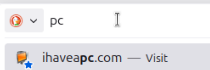
You can also type the keyword in the address bar and hit Enter to directly open the bookmarked website.
Wrap-Up
Firefox’s bookmark keyword feature is a huge time-saver because it turns your bookmarks into quick-access shortcuts. Once you set it up, you’ll wonder how you ever browsed Firefox without it!
Happy browsing.
Transfer Photos & Documents From Mobile Devices To PC Using This Free Tool

Quickly Delete Locked Files And Folders In Windows