How to Change Word Completion Settings in LibreOffice Writer
LibreOffice Writer’s Word Completion feature automatically suggests whole words as you type, based on words you’ve already used in the current document.
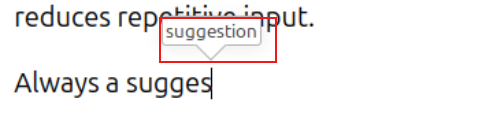
When a suggestion appears, you can press Enter (or another assigned key) to accept it. This helps speed up typing and reduces repetitive input.
Writer builds these suggestions dynamically, so the more you type, the more accurate and helpful the suggestions become. You can turn this feature on/off or customize it.
Here is how:
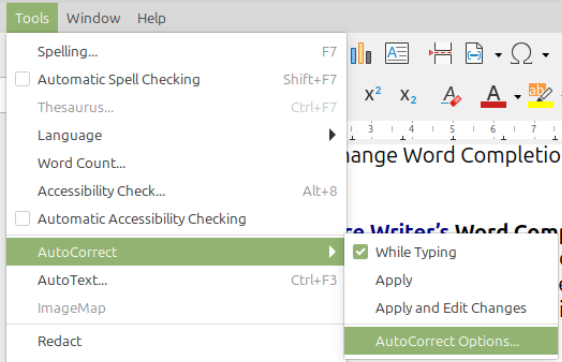
Go to Tools > AutoCorrect > AutoCorrect Options…
From there, click the Word Completion tab. To completely turn off word completion remove the tick mark next to Enable word completion.
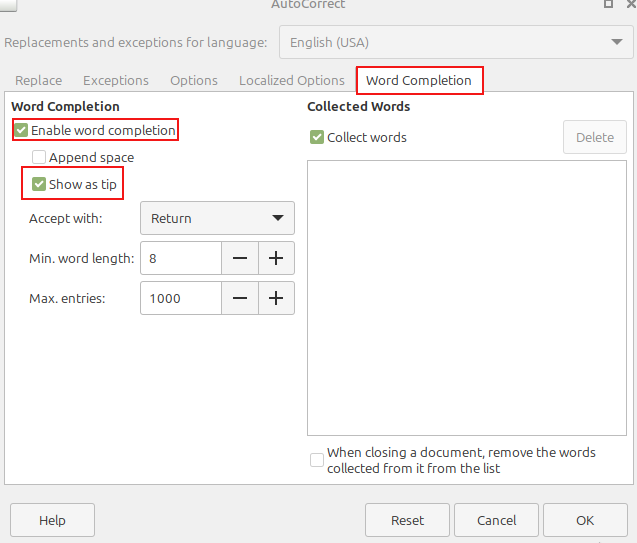
To keep it on but turn off the tip while typing, remove the tick mark next to Show as tip.
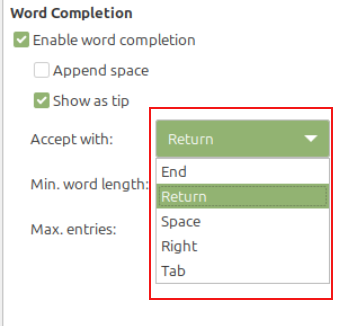
Also, by default, LibreOffice Writer shows you the completed words while typing. To accept them the default shortcut key is Enter/Return but that can be changed to an another key by choosing it from the Accept with drop-down menu.
You can also set a threshold for which word completion is triggered by changing the Min. Word length size (default is 8).
Happy writing.
How To Print Clutter-Free Pages When Using Firefox
Quickly Reverse Search Images When Using Firefox