How to Toggle Smart Features in Gmail
In Gmail, Smart Features are tools powered by machine learning and AI that make your email experience faster, more efficient, and more personalized. Of course, this means scanning your emails using AI. 🙂
Here’s a breakdown of the main ones:
Smart Compose
- Predicts and suggests complete sentences as you type.
- Adapts to your writing style (e.g., how you greet or sign off).
- Lets you hit Tab to autocomplete a sentence.
Example: You type “Let me know if…”. Gmail auto-suggests “you have any questions.”
Smart Reply
- Shows quick, one-tap reply buttons at the bottom of emails.
- Replies are short and context-aware (e.g., “Sounds good,” “Thanks for the update,” “I’ll check and get back to you”).
Smart Search & Filters
- Predicts what you’re searching for based on past behavior.
- Automatically categorizes incoming emails into tabs like Primary, Social, and Promotions.
- Uses AI to highlight important or time-sensitive messages.
Event & Task Extraction
- Detects dates, times, and events in emails.
- Offers to add them directly to Google Calendar or Tasks.
Example: Email says: “Meeting on Monday at 10 AM.” Gmail suggests adding it to your calendar.
Nudges
- Reminds you to follow up or reply to emails you may have missed.
Example: “Sent 3 days ago. Reply?”
Smart Labels & Categorization
- Automatically labels messages like Finance, Travel, or Purchases.
- Helps keep your inbox clean without manual sorting.
- Smart Spam Filtering & Security Alerts
- Uses AI to detect phishing, scams, and spam.
- Warns you about suspicious attachments or senders.
Smart Organization (Priority Inbox & Importance Markers)
- Learns which emails matter most to you and highlights them.
- Important markers (the yellow arrow icon) are added automatically.
- Smart Features and Personalization (Privacy Control)
How To Turn These Off
You can toggle these off by logging into Gmail and accessing See all settings.
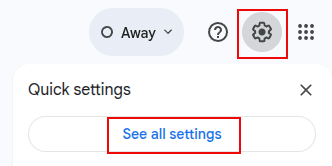
Then from the General section, remove the tick next to Turn on Smart features in Gmail, Chat and Meet.

Turning them off disables features like Smart Compose, Smart Reply, and automatic email categorization.
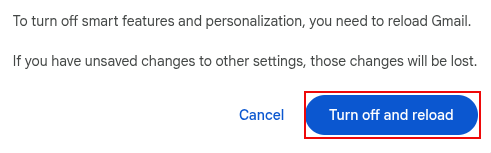
To apply these changes, you will need to reload Gmail.
By the way, once these are turned off, you will get a nudge at the top of Gmail inbox asking you turn them on with just a click. 🙂

Happy emailing.

Mother’s Day Giveaway : CollageIt Pro

How To Create Facebook Friends Graph In Linux Mint / Ubuntu
