Understanding df and du in Linux: What’s the Difference?
When managing disk space on a Linux system, two commands often come up: df and du. They might seem similar because both report disk usage but they actually serve different purposes.
Let’s deep dive into what each one does, when to use it, and how to interpret their output.
What df Does: Check Overall Disk Space
df stands for “disk filesystem”. It shows how much space is available and used on entire filesystems or disk partitions. In simple terms: df tells you how much total space your drive has and how much is left.
Example:
df -h

Explanation:
/dev/sda6 The root partition / is 64% full.
/dev/sdb1 External drive (in this example) is 56% full.
– -h Shows output in human-readable form (GB, MB instead of blocks).
When to Use df:
- To check total disk usage across partitions.
- To see how much space is left before running out.
- Before performing system updates or large installations.
What du Does: Check Directory or File Size
du stands for “disk usage”. It shows how much space is used by files and directories. In simple terms: du tells you how much space a particular folder or file is using.
Example:
du -sh /home/avp
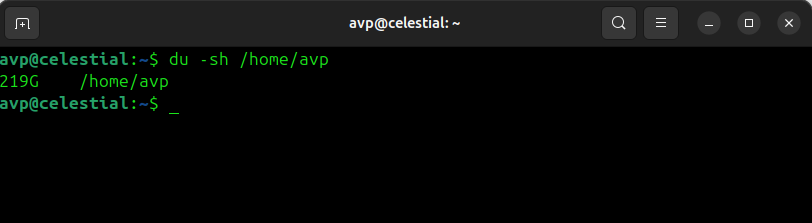
The output shows that /home/avp takes up 219 GB of disk space.
Explanation:
– s Summarize the total size of the directory.
– h Human-readable format.
You can also list the size of each subdirectory:
du -h --max-depth=1 /home/avp/Videos
Output:

When to Use du:
- To find which folders are using the most space.
- To clean up large files or directories.
- To analyze storage usage within a specific path.
Key Difference Summary
| Command | Meaning | Scope | Typical Use |
| df | Disk Filesystem | Entire filesystem / partition | Check total disk space and free space |
| du | Disk Usage | Individual files or directories | Find out which folders are taking up space |
Real-World Scenarios
1.My disk is full. What’s taking up space?
1. Run: df -h
2. Then run: du -h –max-depth=1 /home
This helps identify the specific folder using the most space.
2.How much free space do I have left before an update?
- Use: df -h
3.I want to delete unnecessary large files.
Use: du -ah /home/user | sort -rh | head -10
By the way, here is a quick primer on how to use the head command for sorting output.
Quick Tip to Remember
| Command | Think of it as |
| df | A map of your entire disk — shows overall free and used space. |
| du | A magnifying glass — zooms in on which files or folders use that space. |
Conclusion
Both df and du are essential tools for managing disk space in Linux. Use df to monitor overall storage health, and use du to drill down and locate space-hogging directories. Once you understand the difference, troubleshooting low disk space issues becomes quick and efficient.
Happy exploring.

How To Convert Various Disk Image Formats To ISO In Linux Mint / Ubuntu