How to Enable Disappearing Messages in WhatsApp Web
WhatsApp Web is a desktop-based version of WhatsApp, letting you chat more conveniently from your computer, without using your phone each time you receive a message.
It mirrors your WhatsApp account, letting you send texts, images, files, and voice notes directly from your desktop. Ideal for work or long typing sessions, it brings mobile messaging convenience to your computer.
Just like with the mobile app versions of WhatsApp, you can enable Disappearing messages for individual chats in WhatsApp Web too. This can be useful for privacy and also for deleting unwanted previous messages from your chat timeline.
Here is how to enable it in WhatsApp Web:
Log into WhatsApp Web and from the bottom-left of the main window, click the Settings icon.

From the list of available settings, click on Privacy.
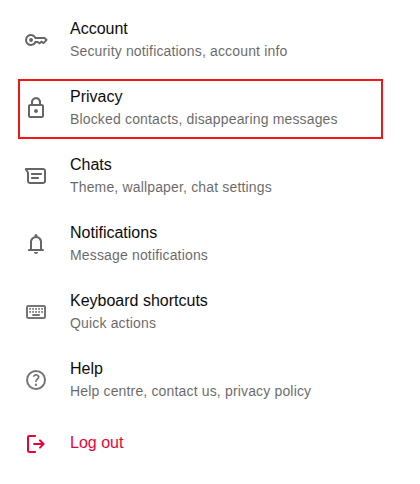
Over there, scroll down to the Disappearing messages section and click on Default message timer.
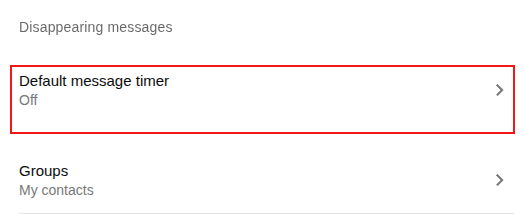
Choose from any of the timer options: 24 hours, 7 days, 90 days.
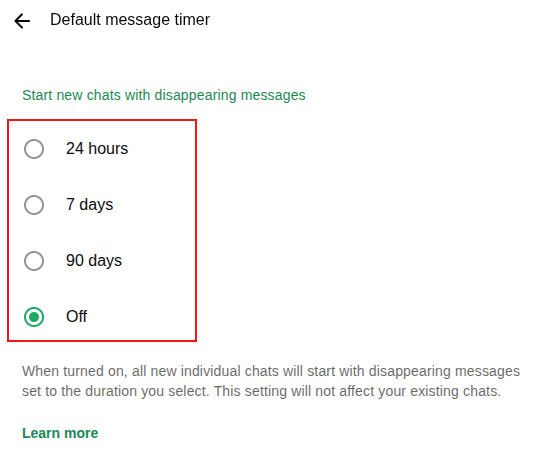
Depending on the timer option selected, the messages in any of the new individual chats from here on will disappear when the timer limit is reached. Existing chats will not be affected by this setting and will continue to remain accessible.
All done.
Hamster Free Video Converter: Easy To Use Free Video Converter

How To Use Click&Clean For Microsoft Edge
