Notes: Keep Sticky Thoughts in Google Drive
If you often find yourself emailing quick reminders to yourself or juggling messy notes across different apps, there’s an easier way.
Notes: Keep Sticky Thoughts in Google Drive by BrowseCraft is a Chrome extension that lets you take notes right inside your browser and automatically sync them to Google Drive.
It’s simple, fast, and perfect for anyone who wants to stay organized without switching tools.
What Makes This Extension Useful?
The idea behind the extension is straightforward: write notes anywhere in Chrome, and they’re saved instantly to your Google Drive. No copying, no saving buttons, no hassle. Just open the extension, start typing, and your thoughts are backed up safely.
Whether you’re planning your day, saving important links, jotting research points, or capturing a sudden idea you can keep everything in one place.
How to Use Notes
Download and install it from the Chrome Web Store.

Click the extension icon to sign-in to your Google account to get started.


Click the pencil icon from the bottom left of the Notes window to create a new note.
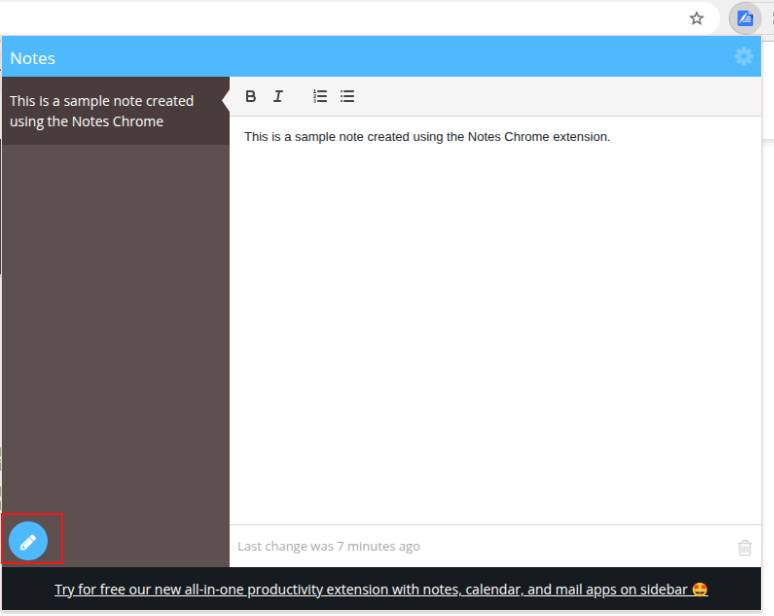
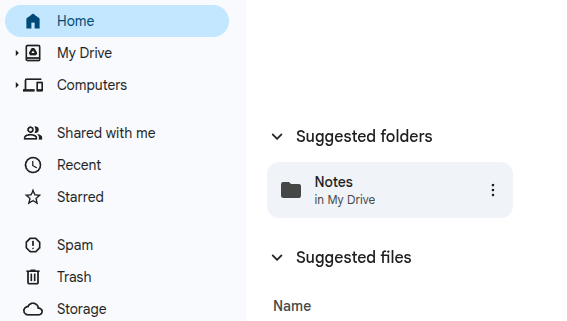
The notes are auto-saved to Google Drive in the Notes folder.

Key Features
Auto-Sync With Google Drive
Everything you type is automatically saved to your Google Drive the moment you start typing. Even if you close the browser or turn off your system, your notes are always safe and accessible.
Smart Title Generation
The extension creates note titles automatically from the first line. Pretty helpful for quick scanning and easy organization.
Drag-and-Drop Reordering
Move notes around effortlessly to prioritize ideas. Perfect for organizing tasks or brainstorming lists.
Text Formatting Options
Make your notes easy to read with:
- Bold text
- Italic text
- Bullet and numbered lists
Great when you want structure without switching to a full editor.
One-Click Drive Access
Open the Google Drive folder that stores your notes with a single click. Everything stays neatly arranged and available from any device.
Why You’ll Love It
- No more sending emails to yourself
- No more losing ideas or links
- Stay focused without leaving the browser
- All notes stored securely in Google Drive
- Fast, lightweight, and clutter-free
So if you’re someone who loves simplicity and hates digital chaos, this extension might become your new favorite tool.
Final Thoughts
Notes: Keep Sticky Thoughts in Google Drive is built for everyday users like students, professionals, researchers, writers, or anyone who needs to save ideas quickly. It helps keep your mind clear and your work neatly organized, right inside Chrome.
Overall, it is a pretty useful no-frills note-taking extension in Chrome.
Do try it out.
How To Enable QR Code Generator In Vivaldi Browser
Open And View Damaged PDF Files With This Free Tool