Meet Your Digital Mailman: SpamAssassin
We’ve all been there: you open your inbox, expecting an important message, only to find it buried under a mountain of digital clutter. The constant deluge of unsolicited emails known as Spam is more than just annoying; it’s a productivity killer and a potential security risk.
But what if you had a diligent, super-fast digital mail carrier who pre-sorted your mail before you even saw it? That’s exactly what Apache SpamAssassin does. It’s an open-source tool that acts as a powerful front line, filtering out junk mail before it clogs up your digital life.
This guide will break down what SpamAssassin does and how it pulls off this important magic, all in plain language.
1. What Does SpamAssassin Do? (The Big Picture)
At its core, SpamAssassin is a content filter and sorting machine. It sits on your email server (the computer that receives your mail), rather than on your phone or laptop.
Think of it as an extremely efficient gatekeeper who inspects every incoming letter. Its primary job is to recommend a classification. It won’t delete your mail without your permission; instead, it looks at the email, applies its judgment, and adds invisible ‘tags’ to the message, essentially whispering to your mail server: “I’m 99% sure this one is a receipt for your coffee.” or “This looks exactly like a scam.“
The Mailroom Sorter
The image below visualizes this process. Incoming emails arrive, and SpamAssassin (depicted here as a helpful robotic mailman) must instantly decide where to route them based on a master checklist. “GOOD EMAIL” (which we call Ham) goes to your inbox, while problematic envelopes (Spam) are deflected toward a dedicated Junk/Spam folder.
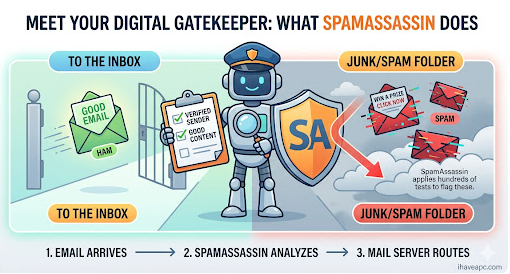
The timeline at the bottom shows how it works: 1. Email Arrives -> 2. SpamAssassin Analyzes -> 3. Mail Server Routes.
The final result? When you open your inbox, it’s already pre-organized, and the spam has been neatly tucked away for you to review (or ignore) at your leisure.
2. How Does SpamAssassin Do It? (The Master Checklist)
This is the most fascinating part: How can a computer distinguish between a genuine coupon from your favorite store and a dangerous scam from a complete stranger? It does it using an incredibly detailed, ever-updated master checklist.
SpamAssassin has hundreds of specialized tests each with its own tiny point tally. For example:
- Does the subject line contain “VIAGRA”? (Wait, let’s check—maybe it’s a medical journal? If not, +2 points).
- Are there ten exclamation marks in a row? (Probably spam—+1.5 points).
- Did the sender forge their ‘From’ address? (This is a huge red flag—+3.0 points).
- Wait, does the signature match a confirmed contact in your address book? (This is very likely ham—-1.0 points).
Inside the Engine: The Scoring System
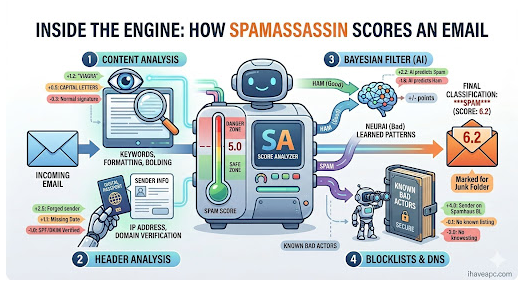
The next graphic visualizes this scoring engine. Every incoming email is fed into the “SA SCORE ANALYZER.” The analyzer holds a delicate SPAM SCORE thermometer, with the threshold usually set around 5.0.
Four main testing stations process the email concurrently:
- Station 1: CONTENT ANALYSIS – Looks at words, bolding, and formatting.
- Station 2: HEADER ANALYSIS – Checks the digital “passport” (IP and domain verification).
- Station 3: BAYESIAN FILTER (AI) – This is the learning machine (more on this below).
- Station 4: BLOCKLISTS & DNS – Consults massive, shared ledgers of “known bad actors” on the internet.
As you can see, the final scored email on the far right has changed color to orange, showing its final score of 6.2, and is tagged ‘FINAL CLASSIFICATION: SPAM‘. The mail server then knows to route it to the Junk folder.
3. The Secret Weapon: Bayesian Learning (The Filter That Gets Smarter)
Perhaps the single most ingenious part of SpamAssassin is its core AI component: the Bayesian Filter.
While the other tests are based on fixed rules (“If the email contains ‘MILLION DOLLARS’, add 3 points“), the Bayesian Filter learns over time from your actions and the actions of thousands of other users. It doesn’t look at individual words in isolation but at patterns of words and their relationships.
The Learning Cycle
This is a dynamic process of Ham vs. Spam (pictured below).
- Incoming emails arrive.
- Users like you go into your Junk folder. You mark an email as “not spam.”
- You also might look in your inbox and mark a genuine-looking coupon as “this is spam.”
This simple feedback loop is what trains the filter’s brain (the PROBABILITY DB). The next time a similar email arrives, the brain (with updated patterns) will assign it more or fewer points.
The Bayesian Filter is what keeps SpamAssassin on its toes, constantly learning from your specific definitions of “what is junk,” and its entire database is updated almost daily by a global community of users, making it exceptionally resilient against new spam.
4. Final Verdict: Your Cleaner, Greener Inbox
Apache SpamAssassin is a masterpiece of open-source collaboration. It’s not a single magic trick but a multi-layered defense. Combining content rules, header checks, blacklists, and cutting-edge machine learning, it has become one of the most trusted email filters on the planet.
For you, this means a cleaner, safer, and much less chaotic digital life. You can focus on the important letters, knowing your diligent digital mail carrier is doing the dirty work in the background.
And the next time you find a stray piece of legitimate mail in your Junk folder, don’t be annoyed. Just mark it as “not spam” and remember: you’re not just correcting an error; you’re helping a whole system get smarter for everyone.
Happy emailing.

How To Block Or Allow Website Specific Cookies In Google Chrome

How to Translate Messages in Gmail Web