FTP vs. SFTP: A Webmaster’s Guide to File Transfer Protocols
As a webmaster, managing files on your server is a core part of your daily routine. Whether you are uploading a new theme, backing up a database, or modifying a configuration file, you need a reliable way to communicate with your server. For decades, the standard way to do this was FTP. Today, SFTP has largely taken its place.
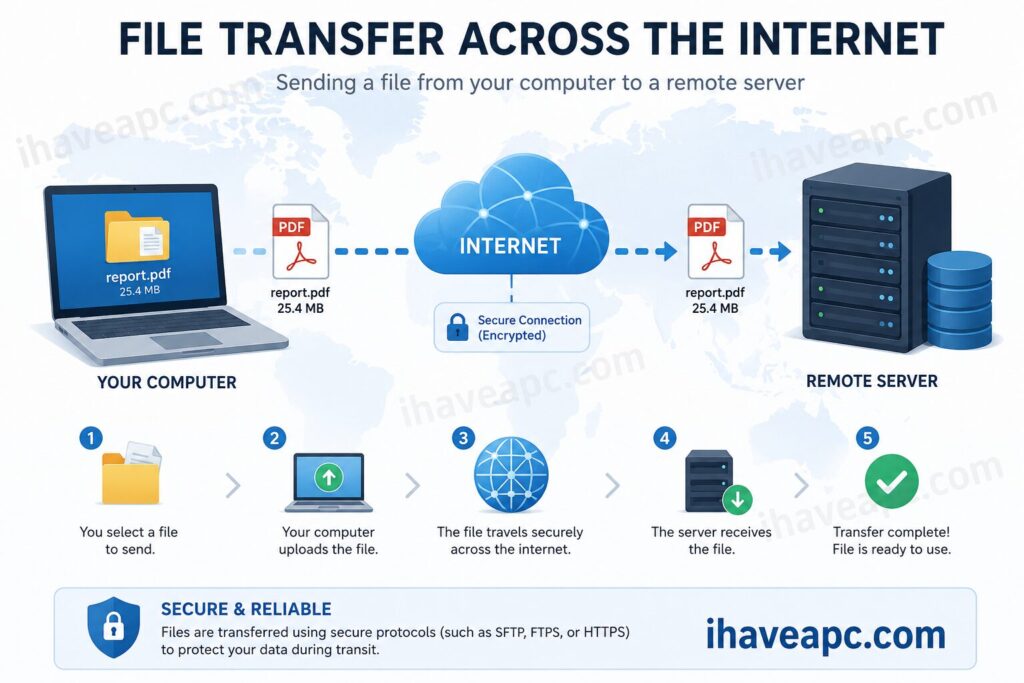
While they sound similar and achieve the same end goal, moving files from a local client to a remote server, their underlying architecture and security profiles are vastly different. With free useful tools like Filezilla, transferring files either through FTP/SFTP is a breeze, webmasters must understand the difference between them.
So here is a technical yet straightforward breakdown of FTP and SFTP, how they differ, and when to use each.
What is FTP (File Transfer Protocol)?
FTP is one of the oldest protocols on the internet, formalized in 1985 (though its origins date back to 1971). It is a standard network protocol used for the transfer of computer files between a client and server on a computer network.
How it works:
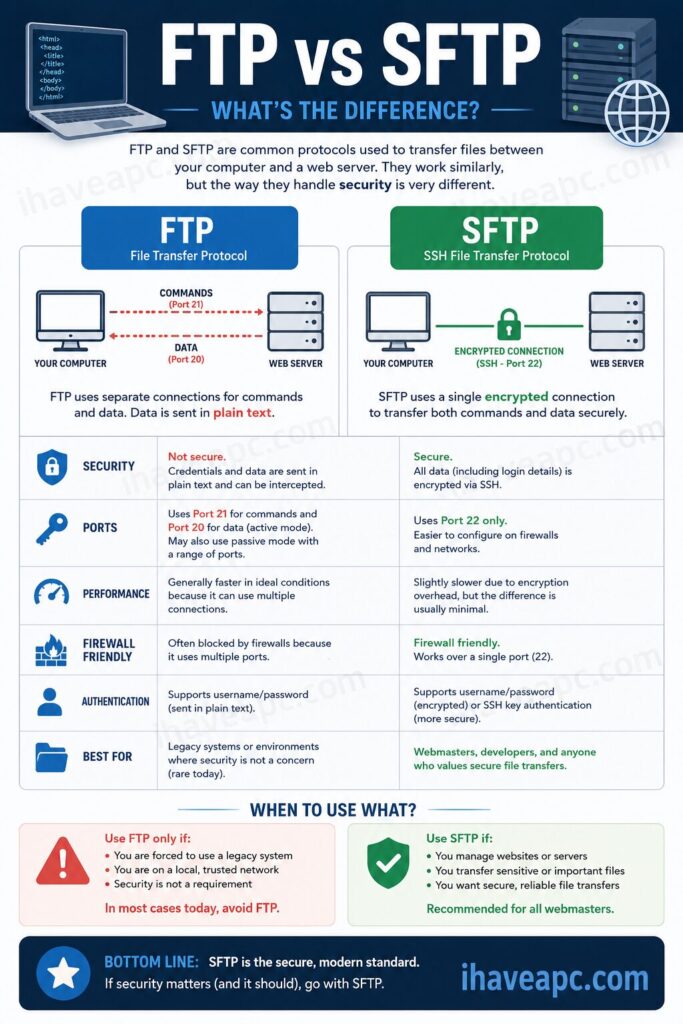
FTP operates on a client-server model and uses two separate channels to operate:
- Command Channel (Port 21): Used for transmitting commands and replies between the client and server.
- Data Channel (Usually Port 20 for active mode): Used for the actual transfer of file data.
The Catch:
FTP transmits all data including your username, password, and the files themselves in plain text. If an attacker intercepts your network traffic (via packet sniffing), they can easily read your credentials and compromise your server.
What is SFTP (SSH File Transfer Protocol)?
SFTP (often confused with FTPS, which is FTP over SSL/TLS) is an entirely different beast. It is a secure file transfer protocol that runs over the Secure Shell (SSH) protocol.
How it works:
Instead of opening multiple ports and sending data in plain text, SFTP routes all file transfers and commands through a single, secure SSH connection.
- Single Port (Port 22): Both commands and data are transmitted over the standard SSH port.
- Full Encryption: Before any data leaves your computer or the server, it is encrypted. Even if someone intercepts the traffic, all they will see is a stream of cryptographic gibberish.
The Technical Comparison
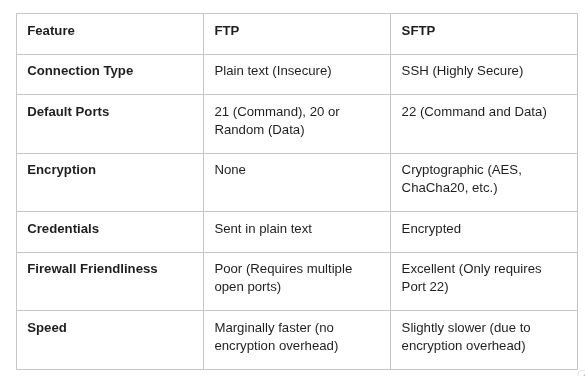
Here is a quick look at how the two protocols stack up against each other:
Use Cases: When to Use Which?
For a modern webmaster, the choice is usually clear, but there are niche scenarios where legacy protocols still exist.
When to use SFTP
In today’s web environment, SFTP should be your default choice.
- Managing Web Servers: Whenever you are connecting to your VPS, dedicated server, or modern shared hosting account to edit live site files.
- Handling Sensitive Data: If your files contain PII (Personally Identifiable Information), financial data, or proprietary code, SFTP is mandatory for compliance (e.g., GDPR, HIPAA, PCI-DSS).
- Simplified Firewall Rules: Because SFTP only uses Port 22, it is much easier for server admins to secure the server firewall compared to opening a wide range of passive ports for FTP.
When to use FTP
Because of its glaring security flaws, standard FTP is largely obsolete for administrative tasks. However, it is still used in a few specific scenarios:
- Anonymous Public Downloads: If you are hosting a repository of public files (like open-source software, public datasets, or legacy driver archives) where user authentication and data privacy are not concerns.
- Internal Legacy Systems: On closed, highly secure internal LANs (Local Area Networks) where packet sniffing from outside actors is impossible, and legacy hardware doesn’t support SSH overhead.
- Automated Device Backups: Some older network hardware (like legacy routers or security cameras) only support dumping their logs or backups via plain FTP.
Final Thoughts
For webmasters, FTP is a relic of an older internet. While it laid the foundation for file transfers, its lack of encryption makes it a massive security liability for web administration. Always use SFTP when managing your websites to ensure your credentials, code, and customer data remain safe from prying eyes.
Happy file transferring.
How To Safely Upgrade Or Uninstall Graphic Card Drivers

How To Create A Custom List In Excel 2010
