
Some Funny Geek Pics
Here are some really funny geek humor pics [All pictures are courtesy of www.pcsympathy.com] Ctrl – C and Ctrl – V would make awesome nicknames for the above two. Â 🙂 Pretty self explanatory but dated – nowadays more freedom…

Here are some really funny geek humor pics [All pictures are courtesy of www.pcsympathy.com] Ctrl – C and Ctrl – V would make awesome nicknames for the above two. Â 🙂 Pretty self explanatory but dated – nowadays more freedom…
1. The Easy Way– a) Double click the LAN icon in the system tray. Click ‘Support’ and then click ‘Details’. (Windows 7 users need to go to ‘Network And Sharing Center>Manage Network Adapters’) b) You can now view the MAC…
We love PCs,majority of the computer users are PC owners. Here are our 5 reasons for owning and loving a PC : 1.Compatibility : Say goodbye to shiny propreitary hardware,a simple Intel machine can be configured to run most of…

Alright,you may have often wondered about how to change your computer name to something cooler than what it is. In Linux Mint/Ubuntu,it is very easy to change the current system/computer name straight from the terminal. To do this : 1.Open…
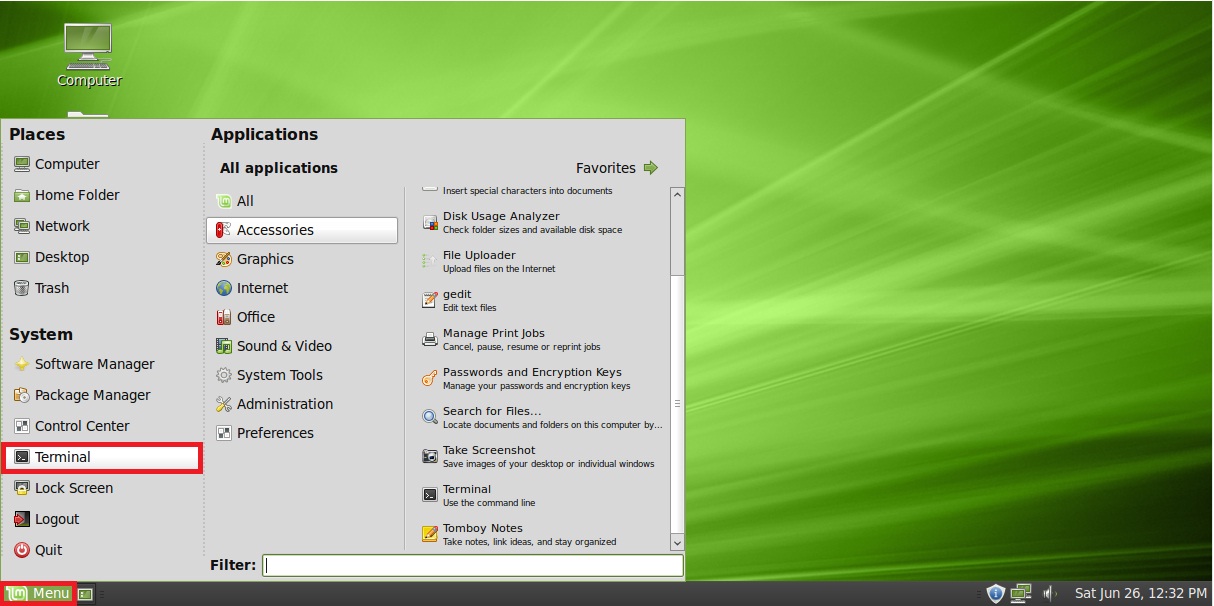
1. Make sure you are online. Click on ‘Menu>Terminal’. 2. Issue the following command in the terminal: sudo apt-get updateEnter your user password when prompted. 3. The system will check online repositories for new versions of the system files as…
[Image courtesy – www.xkcd.com]