Quickly Find Out DNS Server IP Addresses From Linux Mint / Ubuntu Command Line
April 10, 2012
It is useful to know what DNS server IP addresses are being used by the system for troubleshooting as well as for reference.
Here is how to quickly get this information using the Linux Mint/Ubuntu terminal :
Open Terminal and type :
[cc lang=”bash”]
cat /etc/resolv.conf
[/cc]
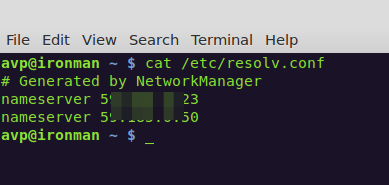
This will display the IP addresses of DNS servers that are being used. What the above command does is really just list the contents of a file named resolv.conf which contains the DNS server info.The same file can be quickly edited to add or remove DNS server IP addresses using any of text editor like gedit or vi.
Cheers.

Prevent Repetitive Strain Injury By Using RSIBreak In Ubuntu
How To Install Ubuntu Restricted Extras In Ubuntu 11.10 Oneiric Ocelot
How To Download And Use Preconfigured Linux Distros In VirtualBox
One Comment