Beginner’s Guide to Linux Shells: Bash, Zsh, Fish, and More
When you first open a terminal on a Debian-based Linux distribution (like Ubuntu, Linux Mint, or Debian itself), you’re usually greeted with Bash — the Bourne Again Shell. Bash is the default shell on most Linux systems and is powerful enough to handle scripts, automation, and everyday command-line tasks.
But Bash isn’t the only shell available. Linux supports multiple shells, each with its own features, strengths, and unique style. Knowing about them can help you choose one that fits your workflow better or simply broaden your understanding of the Linux environment.
In this article, we’ll explore some of the most used shells available in Debian-based systems.
Bash (Bourne Again Shell)
- Default shell in most Linux distributions.
- Compatible with scripts written for the original Bourne Shell (sh).
- Supports history, tab completion, aliases, and scripting.
- Great balance between ease of use and scripting capabilities.
For beginners, Bash is more than enough. You can create small scripts, automate tasks, and use it for everyday navigation (ls, cd, pwd, etc.).
Zsh (Z Shell)
- An advanced, user-friendly shell often seen as an upgrade to Bash.
- Popular for its customization and plugin ecosystem (via Oh My Zsh).
- Features include:
- Smarter auto-completion.
- Spelling correction for commands.
- Theming support for a beautiful prompt.
- Widely used by developers who spend lots of time in the terminal.
If you want a shell that looks good and makes typing commands easier, Zsh is a solid choice.
Fish (Friendly Interactive Shell)
- Designed with usability in mind — great for beginners.
- Key features:
- Autosuggestions as you type.
- Syntax highlighting for commands.
- Easy-to-read configuration.
- Not fully POSIX-compatible, so some Bash scripts might not run directly.
If you’re new and want an intuitive experience without heavy setup, Fish is excellent.
Dash (Debian Almquist Shell)
- A lightweight, minimalistic shell.
- Used as /bin/sh on Debian-based systems.
- Very fast and efficient but lacks advanced features like tab completion.
- Ideal for scripting (especially system startup scripts) where performance matters.
You wouldn’t usually use Dash interactively, but it’s great for system-level scripting.
Ksh (Korn Shell)
- Developed by David Korn at AT&T Bell Labs.
- Combines features of the Bourne shell with C-shell-style features.
- Good scripting capabilities and performance.
- Not as widely used by beginners, but still powerful for advanced scripting tasks.
Ksh is more relevant if you work with legacy systems or scripts.
Tcsh (TENEX C Shell)
- An enhanced version of the original C shell (csh).
- Uses C-like syntax, which might be familiar if you’ve programmed in C.
- Features include command-line editing and programmable completions.
- Less popular today, but still available on most Linux systems.
Mostly useful if you’re working in environments where C-shell scripts are still in use.
Here is a quick snapshot of different Linux shells:
| Shell | Default on Debian/Ubuntu? | Best For | Key Features | Limitations |
| Bash (Bourne Again Shell) | Yes | Beginners & general use | Tab completion, history, scripting, wide compatibility | Less fancy customization compared to Zsh/Fish |
| Zsh (Z Shell) | No | Users who want customization & plugins | Theming, plugins (Oh My Zsh), smart auto-completion, spelling correction | Slightly more setup required |
| Fish (Friendly Interactive Shell) | No | Beginners who want an easy, friendly shell | Autosuggestions, syntax highlighting, simple configuration | Not fully POSIX-compliant (some Bash scripts may fail) |
| Dash (Debian Almquist Shell) | Used as /bin/sh | System-level scripting & speed | Lightweight, very fast, POSIX-compliant | Lacks interactive features (no tab completion, history) |
| Ksh (Korn Shell) | No | Advanced users & legacy scripts | Combines Bourne & C shell features, strong scripting support | Less popular today, limited community |
| Tcsh (Enhanced C Shell) | No | Legacy environments & C programmers | C-like syntax, command-line editing, completions | Outdated, not beginner-friendly |
Switching Between Shells
You can check your current shell with:
echo $SHELL
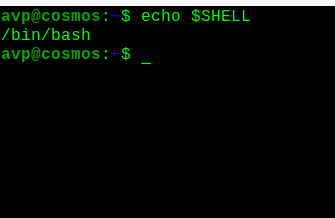
To see all available shells on your system:
cat /etc/shells

To temporarily switch to another shell, follow the on-screen steps (e.g., Zsh):
zsh

To permanently change your default shell:
chsh
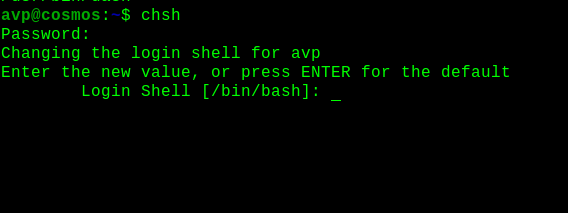
(You’ll need to log out and back in for the change to take effect.)
For most Debian-based users, Bash is the perfect starting point. If you want extra usability and customization, Zsh or Fish are worth trying. For scripting speed, Dash is great. The others: Ksh and Tcsh are more niche but still good to know about.
Experimenting with different shells is a fun way to get comfortable in the Linux terminal and discover what makes your workflow smoother.
Happy exploring.

How To Install Firefox 5 In Linux Mint / Ubuntu
