How to Terminate Other Active Sessions from Telegram Web
Telegram is a cloud-based messaging app known for its speed, security, and versatility. It allows users to send text messages, files, photos, and videos across multiple devices seamlessly, thanks to its cloud sync. Telegram also offers features like large group chats, broadcast channels, voice and video calls, bots, and optional end-to-end encrypted Secret Chats. Its focus on privacy, fast performance, and cross-platform availability makes it a popular choice for both personal and community communication.

When using Telegram across multiple devices (desktop, mobile, and web), it’s convenient to stay logged in everywhere but it also introduces security risks.
Terminating all other sessions except the one you’re actively using is a good idea for several important reasons:
1 . Protects your account from unauthorized access
If you forget to log out on a shared or public device (like a work computer or a friend’s laptop), anyone with access to that device could read your messages or send messages pretending to be you. Ending older sessions instantly removes that risk.
2. Reduces exposure if a device is lost or stolen
A lost phone or stolen laptop that still has an active Telegram session becomes a direct entry point into your chats. Terminating all sessions shuts down those access points immediately.
3. Ensures privacy when using web or temporary devices
Telegram Web is often used from browsers that might be auto-logged in or cached. If you used it on a temporary or borrowed system, a forgotten open session can leak private conversations. Cleaning up unused sessions keeps your data safe.
4. Stops silent background access
Unlike some apps, Telegram sessions stay active until you remove them. This means an old session you forgot about could continue receiving all your messages without any notification to you. Terminating unused sessions ensures only your active device can access your chats.
5. Reduces risk from compromised devices
If a device has malware or is no longer under your control, its active Telegram session could be monitored. Removing other sessions cuts off access from any device you no longer trust.
6. Keeps your activity more manageable
Multiple active sessions can clutter your device list and make it harder to track where you’re logged in. Clearing unneeded ones keeps things organized and makes it easier to spot suspicious logins.
Terminate active sessions through Telegram Web
A common way to access Telegram is through the web browser. So, here is how to terminate other sessions when you are using Telegram Web:
Open Telegram Web and click the burger menu from the top left. Then choose Settings from the drop-down.

Scroll down and click the Devices section.

There will be a number next to it indicating the number of active sessions. (2 in this example).
You will find the details of the active sessions including the currently logged one.

Click the Terminate All Other Sessions link to logout from everywhere else except the current one.
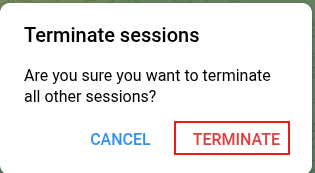
There will be a confirmation dialog, choose TERMINATE. This ends all other active sessions.
To sum it up, terminating unused Telegram sessions improves security, protects privacy, and ensures that only the device you’re currently using has access to your chats.
Happy messaging.
How To Turn Off Recommendations in Firefox

Centrally Manage Various Cloud Storage Services Using MultCloud