Google Docs: Turn Any Paragraph Into a Checklist
Google Docs is often used for writing, but it also works surprisingly well for organizing tasks. One useful feature many people overlook is the ability to turn any paragraph into an interactive checklist.
How to create a checklist
You don’t need templates or add-ons. Simply select the text you want to turn into tasks, then go to Format > Bullets & numbering > Checklist menu.
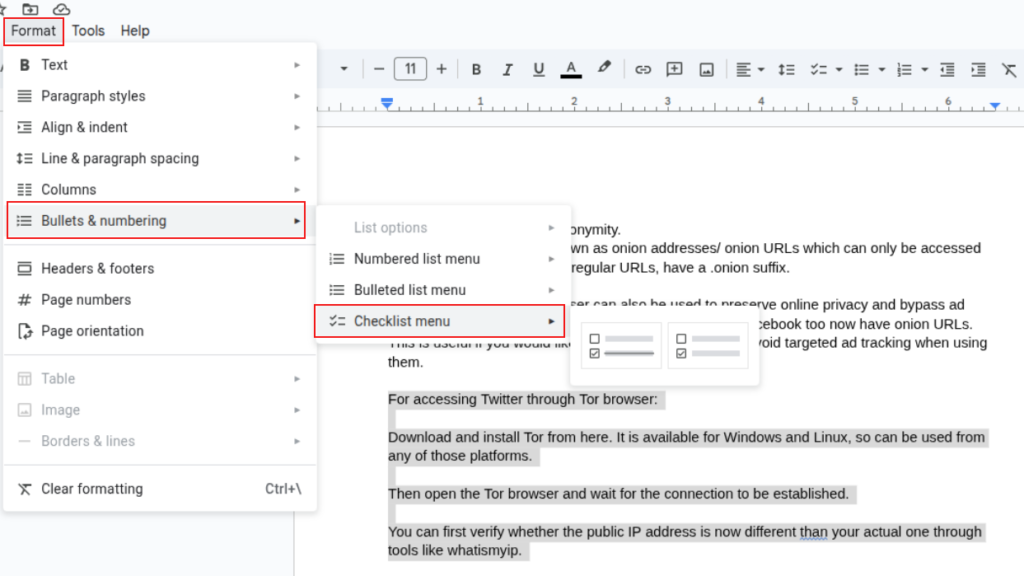
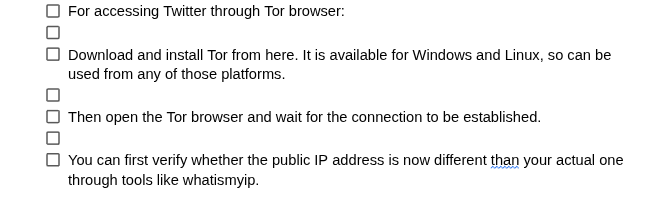
Your text instantly becomes a list with clickable checkboxes.
Why do many users miss this feature?
Most people create checklists by typing square brackets or copying them from another document. Others rely on separate task apps, unaware that Google Docs already includes a built-in checklist.
Why checklists are so useful
Checklists in Google Docs are interactive and collaborative. Anyone with access to the document can check or uncheck items, and the changes sync in real time. This makes them ideal for to-do lists, review steps, meeting action items, or simple project tracking without leaving the document.
When to use it
Use checklists to track progress, assign simple tasks, or keep everyone aligned while working on the same document.
In short, with this simple yet not widely used option, Google Docs can double as a lightweight task manager, saving time and reducing the need for extra tools.
Happy editing.

How to Download a Backup of Your Google Photos

Quickly Encrypt/Decrypt Files And Folders In Windows
