How to Check Battery Status of Wireless Devices in Linux Mint 22.2
Wireless peripherals like keyboards and mice are convenient, but keeping track of their battery levels is important to avoid sudden disconnections especially while working or gaming.
Linux Mint 22.2 makes this easy through its built-in Power Manager module. So there is no need for terminal commands or third-party apps.
Open the system menu and choose Settings.
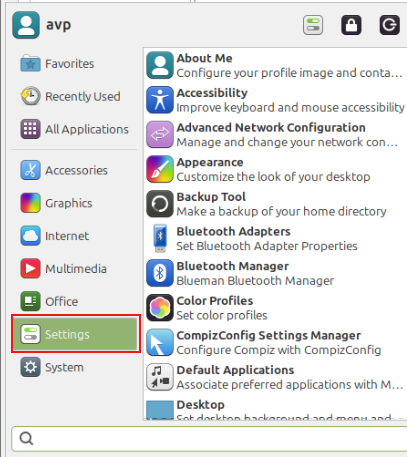
Then select Power Manager.

Go to the Devices tab. The battery percentage will be displayed next to each detected device.

If the battery is low, a warning indicator may appear depending on the model and driver support.
Troubleshooting Tips
If your device does not appear in the list:
- Ensure Bluetooth is turned on.
- Repair the device using Bluetooth settings.
- Make sure the hardware supports reporting battery levels (not all older devices are compatible).
Update the system using:
sudo apt update && sudo apt upgrade
For USB wireless dongles, the device must support power reporting.
Overall, Linux Mint 22.2 provides a clean and convenient way to monitor the battery status of wireless peripherals directly from the Power Manager. This helps in keeping an eye on the battery levels of wireless devices ensuring that you can quickly replace the batteries without disruption.
All done.

How To Organize Tabs By Color In Firefox

How To Install VLC 2.0 In Linux Mint 12 / Ubuntu 11.10
