Geofencing: The Invisible Boundaries Around Us
Have you ever walked past your favorite coffee shop, and suddenly your phone buzzes with a 20% off coupon for a latte? Or maybe your smart thermostat magically knows to start warming up the house when you’re just a mile down the road from work?
It’s not magic, and your phone isn’t reading your mind. It’s all thanks to a piece of technology called geofencing.
It sounds like a heavy, industrial term, but the concept is actually incredibly simple and it’s already built into almost all of the devices we use every day. Here is a plain-English breakdown of what geofencing is, how it works, and why it matters.
What is Geofencing?
In the simplest terms, a geofence is an invisible, virtual boundary drawn around a real-world physical location.
Think of it like an invisible dog fence. But instead of a collar giving a warning beep when a puppy crosses the yard line, a mobile device (like your smartphone or smartwatch) triggers a specific digital action when it crosses the invisible boundary.
How Does Geofencing Actually Work?
Behind the scenes, geofencing relies on a few different location-tracking technologies working together to figure out exactly where you are. According to TechTarget’s technology glossary, a geofence primarily uses:
- GPS (Global Positioning System): The same satellite tech that gives you driving directions.
- Wi-Fi and Cellular Data: Your phone is constantly pinging nearby cell towers and Wi-Fi networks, which helps pinpoint your location even if you’re indoors where GPS signals struggle to reach.
- Bluetooth Beacons & RFID: For hyper-local, indoor tracking (like an app knowing exactly which aisle you are standing in at the grocery store).
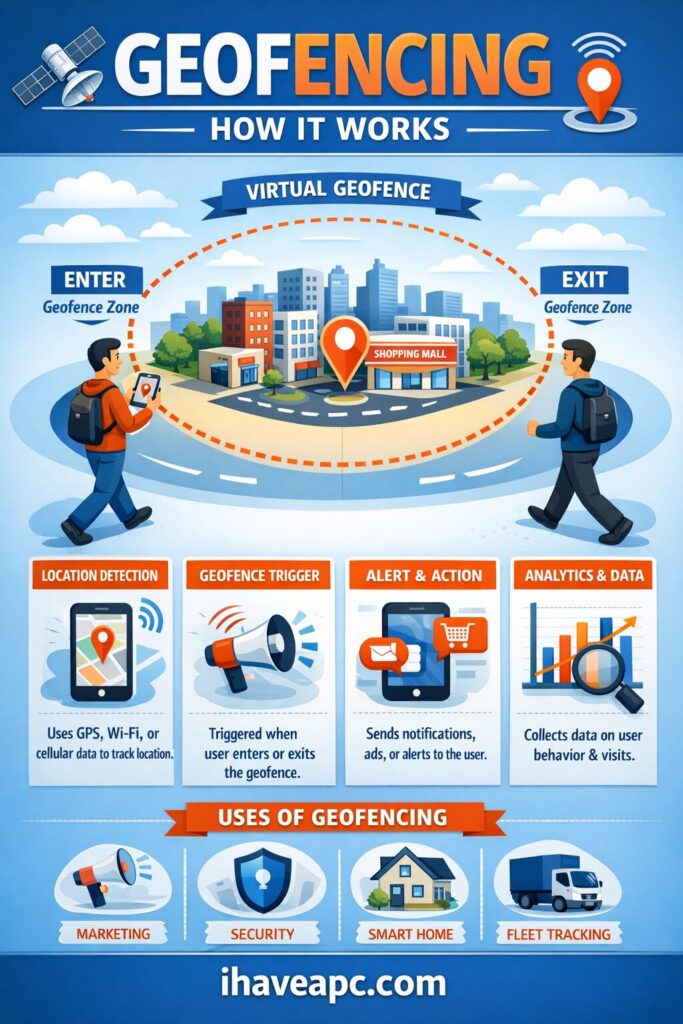
To set this up, a developer literally draws a boundary on a digital map—say, a 100-foot radius around a building. They then program a simple “If This, Then That” rule. If a device with our app enters this radius, Then send a welcome text. If the device leaves the radius, Then lock the smart doors.
Real-World Examples
Geofencing bridges the gap between the digital world and the physical one. As highlighted by tech resources like CIO and Kaspersky, it is used everywhere once you know what to look for:
- Smart Homes: Your lights turn on and your garage opens automatically as you pull into your neighborhood.
- Parental Controls: You get an automatic text notification the moment your child safely arrives at school.
- Retail Marketing: A store sends you a targeted promotion right when you are in the shopping mall (or, cheekily, when you walk into a competitor’s store).
- Aviation Security: Modern drones are hardcoded with geofences that physically prevent their motors from flying them into restricted airspace, like airports or stadiums.
The Elephant in the Room: Privacy
Let’s be candid: any technology that tracks your physical location naturally raises some “Big Brother” privacy concerns. It can feel a little invasive when a retail app knows exactly which street corner you are standing on.
But here is the reality check: you are entirely in control. As noted by Coursera’s guide on digital marketing and geofencing, this technology heavily relies on users opting in.
If you have ever downloaded an app and received a pop-up asking, “Allow [App] to access your location?”, that is the app asking for permission to use geofencing. If you select “Never” or “Only while using the app,” you are effectively disabling their ability to passively track you in the background. Geofencing only works if you give your phone permission to participate.
The Bottom Line
Geofencing isn’t a malicious tracking tool; it’s simply a layer of code that makes our apps smarter, our homes cozier, and our lives a bit more convenient. By understanding how the invisible lines are drawn, you can make informed choices about when to share your location and when to opt-out.

How to Generate Your Dropbox Personal Data Report
What Are HTTP 4xx Status Codes: A Cheatsheet