Auto-Empty Deleted Messages in Outlook Web.
August 25, 2025
Outlook Web lets you auto-empty the deleted items/messages when you log out.
Here is how to do that.
Log in to Outlook Web and click the gear icon to access settings.

From under the Settings section, choose Mail > Message Handling. Then, from the Message options section, enable the tick mark next to Empty my deleted items folder.
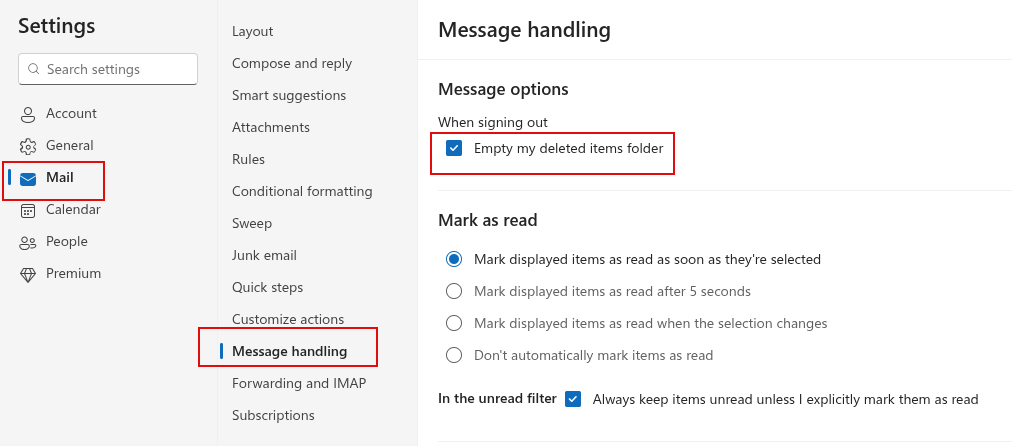
So from now on, when you log out of Outlook, the messages in the Deleted Items folder will be automatically deleted.
By the way, there are other things you can do in Outlook Web to simplify folder management, such as color-coding them and adding them to Favorites.
Happy emailing.
Related Posts

Quickly Encrypt/Decrypt Files And Folders In Windows
Halloween Giveaway: WinX HD Video Converter Deluxe For Free

Telegram Web: Change File Size Limits for Auto-Downloaded Media
About The Author
admin
One Comment
This article is super helpful! I love how it explains the automatic deletion feature in Outlook Web. The tips on color-coding and adding folders to Favorites are game-changers for my email organization. Simple yet effective advice—definitely a must-read for anyone looking to boost their Outlook productivity!grow a garden calculator