The Hidden Traps in Your Social Media Feed
We’ve all been there: you’re casually scrolling through your social media feed, and a post catches your eye. Maybe it’s a breaking news headline that seems too shocking to be true, an advertisement for a premium product selling at a 90% discount, or a message from a friend saying, “OMG, look who died, I think you know them!”
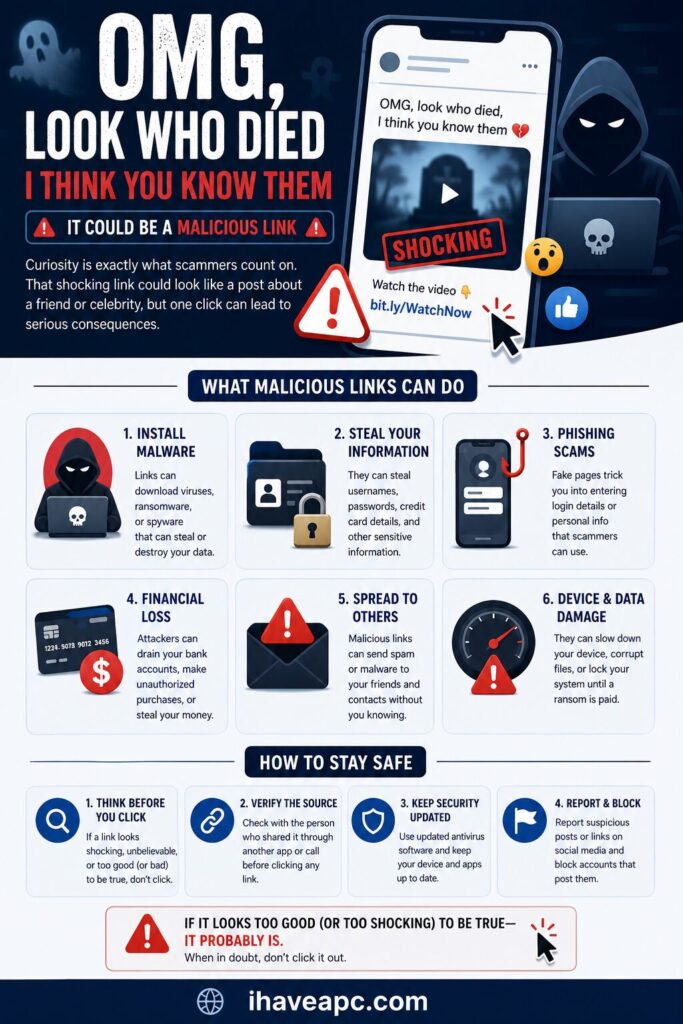
Curiosity takes over, and your thumb hovers over the link.
In the cybersecurity world, that single click is exactly what malicious actors are waiting for. While social media connects us, it has also become a premier “market” for cybercriminals.
Attackers leverage our psychological vulnerabilities like curiosity, fear, urgency, and the inherent trust we place in our friend networks to orchestrate highly sophisticated digital traps.
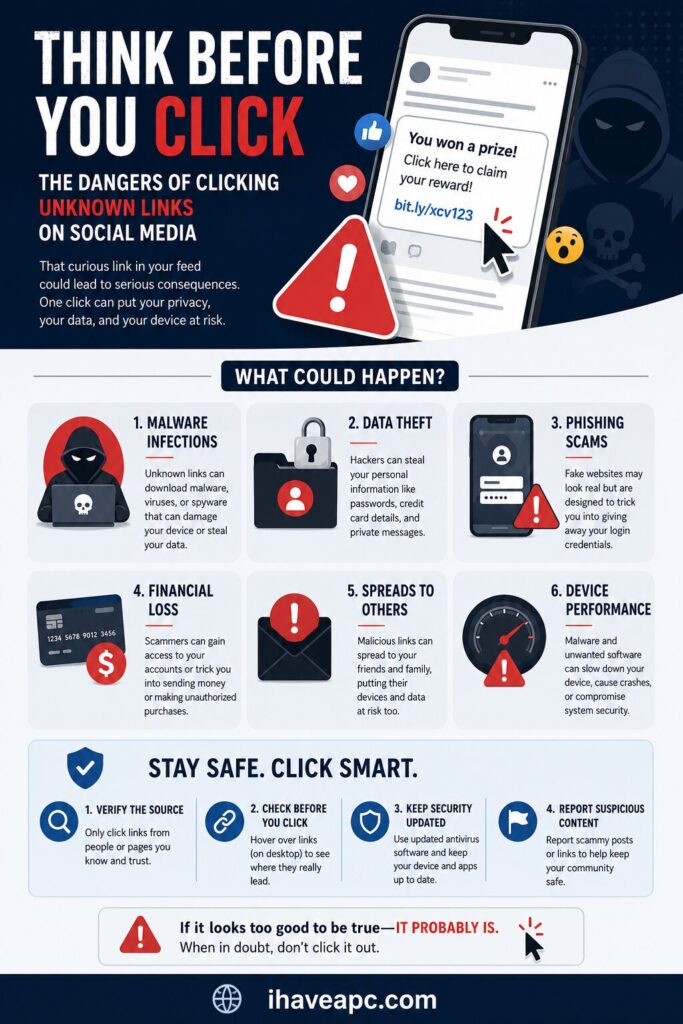
Understanding the underlying dangers of these unknown links and implementing straightforward defensive habits can dramatically reduce your risk of becoming a statistic.
The Dangers Of Clicking Unknown Links
Clicking a compromised link is not just a detour to an annoying webpage; it can trigger a cascade of invisible, malicious processes. The primary threats include:
1. Phishing and Credential Theft
Phishing is a deceptive mechanism designed to steal your identity data and financial account credentials. When you click a fraudulent social media link, you are often directed to a spoofed website that meticulously mimics a legitimate platform, such as your bank or an email provider.
Because humans naturally evaluate a website’s validity based on its “look and feel,” it is incredibly easy to be fooled into typing in your username, password, or credit card details.
2. Malicious Software (Malware) Infections
You can by simply clicking a link install malicious software on your device without your conscious consent or knowledge . This includes spyware, ransomware, or Trojans that quietly mine your phone or computer for stored passwords, session cookies, and financial data.
3. Account Hijacking and Network Exploitation
Once an attacker gains your login credentials, they don’t just stop at your profile. Attackers frequently use automated scripts to hijack compromised accounts and blast out the exact same malicious links to all of your connected friends.
This exploits the trust within your relationship network, causing a domino effect of infections among your family and peers.
How to Safeguard Your Online Accounts and Finances
Protecting your digital life doesn’t require a degree in computer science. Implementing a few high-impact habits can keep your data and money securely locked down.
Step 1: Master the “Pause” and Inspect the URL
Cybercriminals rely heavily on emotional triggers like urgency or excitement to force immediate, impulsive actions before critical thinking can kick in. Introducing a tiny delay can dramatically disrupt this manipulation.
Look closely at the link: Before clicking, read the actual URL domain text. Attackers often use slight typos (e.g., bankofamerca.com instead of bankofamerica.com) or hide complex redirect strings within the link to mask the destination. If the link uses an IP address instead of a domain name, or includes unusual symbols like the @ sign, treat it as highly suspicious.
Step 2: Use Multi-Factor Authentication (MFA)
If you inadvertently click a bad link and expose your password, Multi-Factor Authentication acts as your ultimate safety net. MFA requires two or more verification factors to gain account access.
Even if a hacker successfully phishes your password, they cannot access your account without that secondary, time-sensitive code sent to your authenticator app or physical device. Turn this on for every email, social media, and financial account you own.
Step 3: Implement the “Out-of-Band” Rule for Financial Alerts
If you see a post or receive a direct message claiming your bank account is locked, or that you owe an immediate payment, never use the link provided in that message to resolve the issue.
Instead, close the app, open your browser, and manually type in the official website address of your financial institution, or call the number on the back of your payment card.
Step 4: Secure Your Devices with Automatic Updates
Keep your smartphone and computer operating systems, browsers, and security software strictly up to date. Security patches are routinely deployed to fix vulnerabilities that malicious links try to exploit. Enabling automatic updates ensures that your browser can actively block known malicious websites and prevent silent malware downloads.
Action Plan: What to Do If You Already Clicked
If you realize you have fallen for a social media trick, immediate damage control can minimize the fallout:
- Change Passwords Swiftly: If you entered credentials on a suspected site, immediately change the password for that account and any other accounts that share the same password.
- Alert Your Bank: If financial details were exposed, notify your bank or credit card issuer immediately to freeze your cards and monitor for unauthorized transactions.
- Run a Security Scan: Execute a full scan using a trusted antivirus or antimalware application on your device to ensure no malicious tracking scripts were left behind.
By pairing healthy skepticism with modern security tools like MFA, you can confidently navigate social platforms without handing over the keys to your financial and digital life.
Stay safe and happy browsing.

Less is More For Your Digital Wellbeing

The Smartest Phone Move You Can Make in 2026 Is Going “Dumb”