Here is how to quickly zip and unzip files using Linux Mint/Ubuntu terminal :
1. Install zip and unzip if not present by typing :
[cc lang=”bash”]
sudo apt-get install zip
sudo apt-get install unzip
[/cc]
2. Once installed, to compress files or folders in .zip format, type :
[cc lang=”bash”]
zip nameoftargetziparchive *
[/cc]

This will put all the files from current directory into the archive named docs as specified and saved as docs.zip.
To compress only a single specific file from current directory :
[cc lang=”bash”]
zip nameofarchive filetobecompressed
[/cc]

2. To unzip the files into a target directory :
[cc lang=”bash”]
unzip nameofarchive -d pathwheretoextract
[/cc]

Note that specifying just name of archive will unzip it’s contents into the current directory.
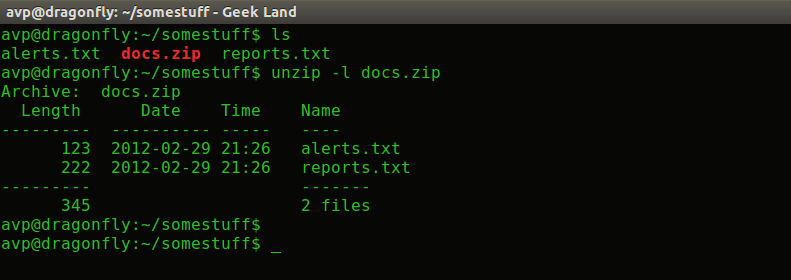
To quickly list what files are present in the zip archive :
[cc lang=”bash”]
unzip -l nameofarchive
[/cc]
To find out other cool features, as always use man command :
[cc lang=”bash”]
man zip
man unzip
[/cc]
Happy compressing!