FTP, or File Transfer Protocol, is a standard protocol for transferring files between a client and a server on a computer network. SFTP, or Secure File Transfer Protocol, is an extension of FTP that adds a layer of security by using an encrypted connection.
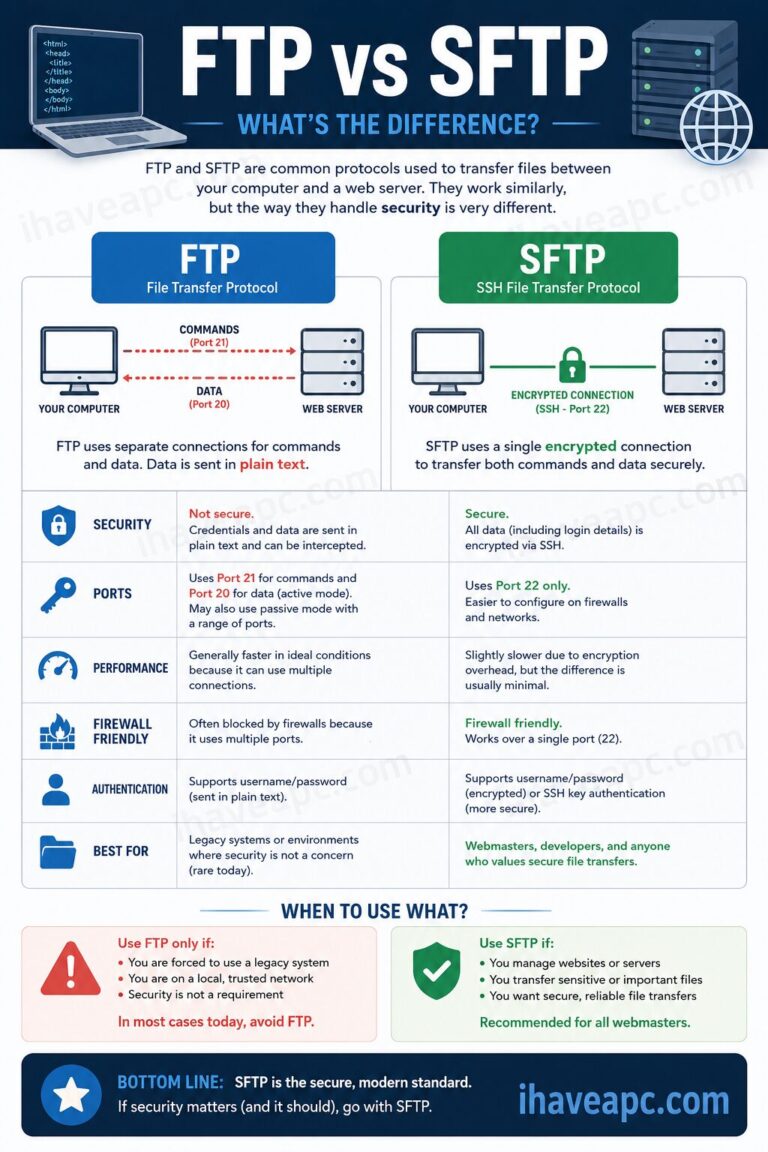
The main difference between the two is that SFTP provides a secure, encrypted way to transfer files, while FTP does not.
Let us break down the key differences between FTP and SFTP.
What is FTP?
FTP is one of the oldest and most widely used protocols for moving files over the internet. It operates on a client-server model, where an FTP client (like FileZilla) connects to an FTP server to upload or download files.

Think of it as a simple highway for data. While it’s great for quickly moving files, FTP sends data, including your username and password, in plain text. This means anyone who can intercept the data packets on the network can see your login credentials and the files you’re transferring.
This lack of security makes it a poor choice for transferring sensitive information.
What is SFTP?
SFTP is not a standalone protocol but rather a feature of the SSH (Secure Shell) protocol. It’s built on top of SSH, which means it uses the same encryption and security features. When you use SFTP, your data including your login information is encrypted before it leaves your computer.

This creates a secure tunnel for the data, preventing anyone from snooping on your connection. SFTP is the preferred method for anyone who needs to transfer files securely, whether it’s for website management or handling confidential data.
Key Differences: FTP vs. SFTP
| Feature | FTP (File Transfer Protocol) | SFTP (Secure File Transfer Protocol) |
| Security | Not secure. Sends data and credentials in plain text. | Very secure. Encrypts all data, including credentials. |
| Protocol | Standalone protocol. | An extension of the SSH protocol. |
| Port | Uses port 21 by default. | Uses port 22 by default (SSH port). |
| Performance | Can be slightly faster due to less overhead. | Can be slightly slower due to encryption overhead. |
| Use Case | Suitable for public, non-sensitive file transfers. | Essential for secure transfers, like managing websites or confidential data. |
Which One Should You Use?
For web users and webmasters, the choice is clear: always use SFTP whenever possible. The security benefits far outweigh any minor performance differences. Most modern web hosting providers support SFTP, and it’s typically the default setting in FTP clients.
Using SFTP protects your website from potential attackers and keeps your sensitive data, like your credentials and files, safe from prying eyes. Only use FTP if you absolutely must, and only for non-sensitive data that you wouldn’t mind being public.
Happy file transfers.