Adaptive Junk Filtering in Mozilla Thunderbird is a built-in smart spam detection system that learns to recognize and automatically move unwanted (junk/spam) emails to the Junk folder based on your actions and training over time.
How It Works
Thunderbird uses Bayesian filtering, a form of statistical analysis, to identify junk mail.
When you mark an email as Junk, Thunderbird learns the characteristics (words, headers, senders, etc.) of that message. When you mark a legitimate email as Not Junk, it also learns what not to consider spam.
So over time, this training improves Thunderbird’s accuracy as it adapts to your specific mailbox and email habits.
How to Enable or Configure
For configuring it on an account-level basis, go to Account Settings.
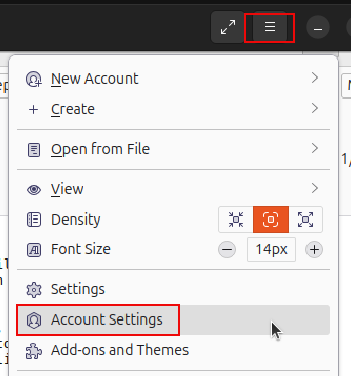
Click on Junk Settings from the left pane. From the right pane, check Enable adaptive junk mail controls for this account. Choose where to move junk messages (usually the Junk folder).

Logging
To check if the filtering is working, you can go to the Thunderbird settings (not the individual account settings), and click on Privacy & Security.
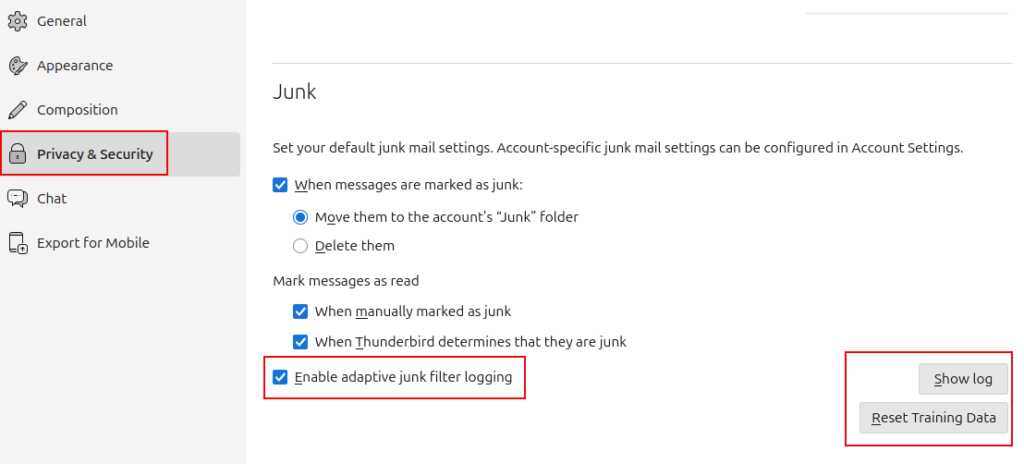
View the Adaptive Junk Mail Log by clicking the Show log button.

To reset the filter and start all over again, click the Reset Training Data button.
Benefits of Adaptive Junk Filtering
- Reduces spam in your inbox without depending on external services.
- Works locally, your mail habits and junk data are stored privately on your computer, not on a remote server.
- Can be combined with your email provider’s spam filter for stronger protection.
Tips for Best Results
- Train Thunderbird consistently for a few weeks by marking several dozen junk and non-junk mails.
- Periodically review your Junk folder to correct false positives.
Happy filtering.