Gmail includes a helpful feature called Send & Archive, designed to make your inbox cleaner and more organized. It’s perfect for people who like to keep things tidy and finish conversations without deleting them.
What Is Send & Archive?
Normally, when you reply to an email, the conversation stays in your Gmail inbox. Over time, this can make your inbox look crowded.
The Send & Archive feature changes that. When you use it, Gmail does two things at once:
Sends your reply, and archives the conversation (removes it from your Inbox but still keeps it in All Mail).
This means your email isn’t deleted, it’s just moved out of sight. You can still find it anytime by searching in Gmail.
How to Enable Send & Archive in Gmail web
Open Gmail in your web browser. Click the gear icon in the top-right corner and choose See all settings.
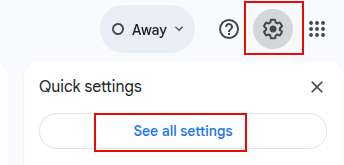
In the General tab, scroll down to find Send and Archive. Then select Show Send & Archive button in reply.

Scroll down to the end and click the Save Changes button.

After turning this on, you’ll notice a new blue Send+ button with an archive icon next to the regular Send button whenever you reply to emails.

You will see a notification about the reply archived whenever you reply with this button.

Where to find these archived emails
Go to Gmail and click All Mail or use the search bar and type part of the subject, sender’s name, or keywords.

Gmail will show them instantly.

Benefits of using Send and Archive
- Keeps your inbox clutter-free.
- Helps you focus only on new or pending messages.
- Works perfectly for those email conversations that are now not relevant.
In short: Gmail’s Send & Archive feature helps you stay organized without losing any important emails. Just enable it once, and you’ll enjoy a cleaner, distraction-free inbox every day.
Happy emailing.