The Firefox sidebar makes browsing easier by keeping useful tools in one place, right next to the webpage you are viewing. You can quickly open bookmarks, browsing history, or synced tabs without leaving the current page. This saves time and reduces the need to jump between multiple tabs.

It also helps you stay organized and focused. Instead of opening new tabs for small tasks, you can use the sidebar to handle them alongside your main work. Overall, the Firefox sidebar keeps your browser cleaner and helps you get things done faster.
If you feel it clutters your browsing space, you can always toggle it.
Here is how:
Access Firefox preferences from the address bar:
about:preferences
Scroll to the Browser Layout section and remove the tick next to Show sidebar.
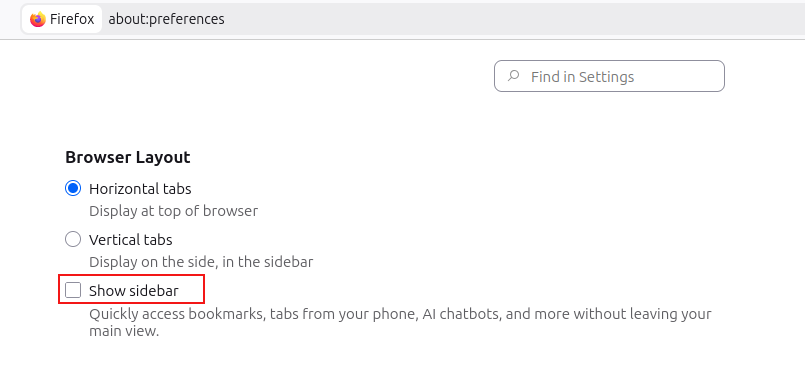
This will hide the sidebar and give you more space in your Firefox window.