We have all experienced it: you click over to your WhatsApp Web tab after an hour of focus, only to be greeted by a spinning wheel and a tedious “Connecting…” status bar. As you wait for your messages to catch up, the friction is palpable.
Modern web browsers aggressively “freeze” background tabs to save RAM and battery life. Fortunately, WhatsApp Web offers a solution: Background Sync.
Here is how to enable it:
Login to WhatsApp Web and click on your profile icon from the bottom left to access settings.

Click on Notifications.
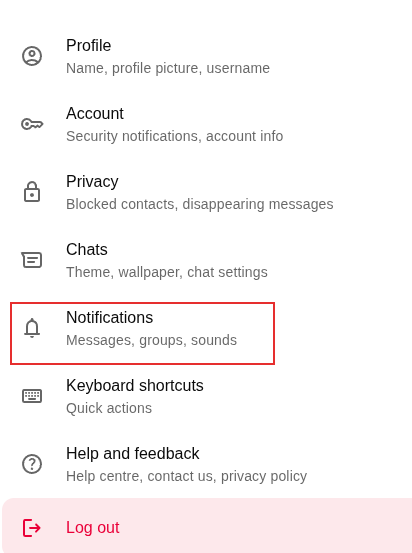
From the Notifications section, enable the option Background sync.
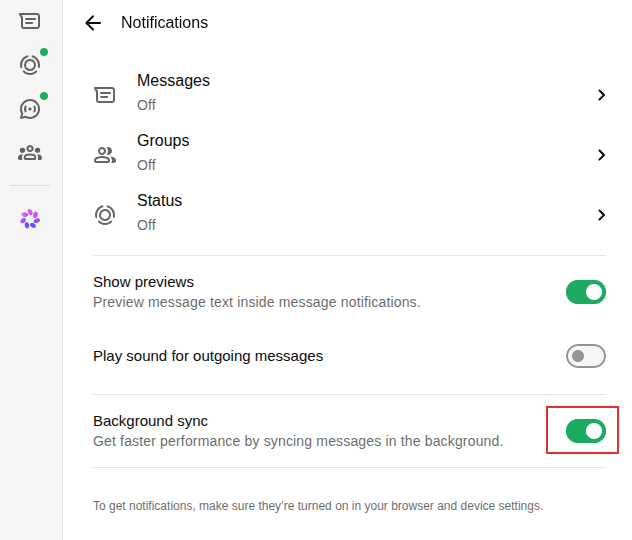
Here is a precise look at how this feature operates behind the scenes and why enabling it drastically improves your desktop workflow.
How Background Sync Works Under the Hood
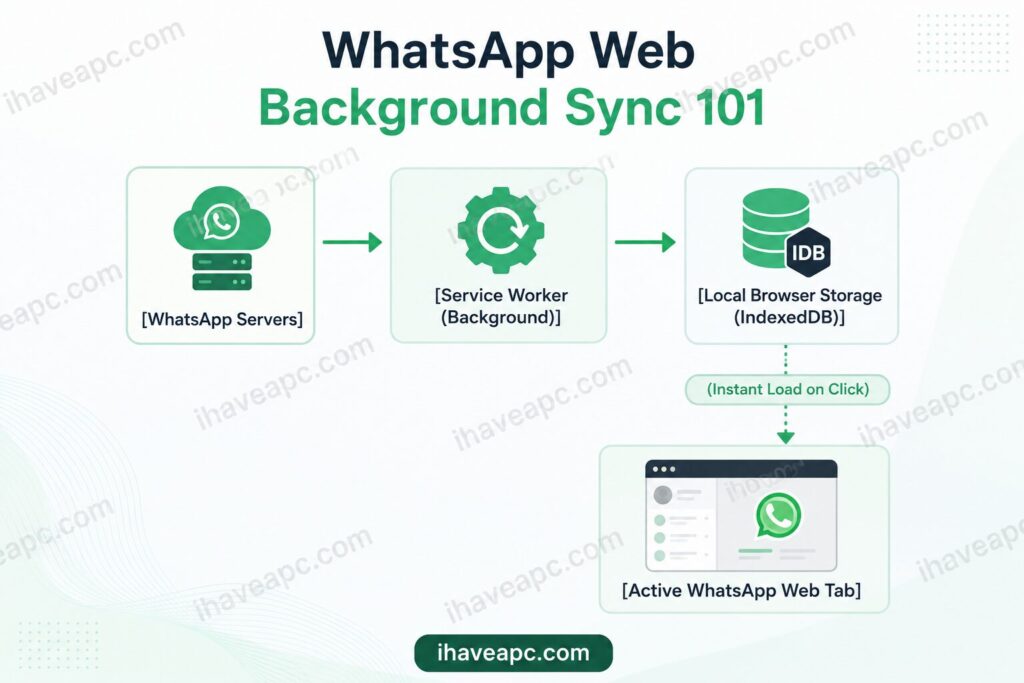
When you grant WhatsApp Web permission to sync in the background, you are allowing it to bypass standard browser throttling using advanced web architecture.
1. The Role of Service Workers
Instead of relying on the active web page to stay awake, WhatsApp Web registers a Service Worker. This is a lightweight script that runs independently of your open tabs. Even if the WhatsApp tab is minimized, buried under other windows, or your browser itself is minimized, the Service Worker remains operational.
2. Proactive Data Caching
While you are working in other applications, the Service Worker periodically establishes a brief, secure connection with WhatsApp’s servers. It fetches new messages and media metadata, immediately writing them to your browser’s local database (IndexedDB).
3. Native Multi-Device Architecture
Because WhatsApp uses an independent multi-device framework, the desktop client communicates directly with the cloud. Background sync operates autonomously—meaning your messages will continue to download on your computer even if your smartphone is temporarily powered down or lacks internet access.
Why Enable Background Sync
Turning this feature on transforms WhatsApp Web from a reactive page into a proactive desktop application.
- Zero “Catch-Up” Lag: Because messages are pre-fetched and stored locally, clicking into your WhatsApp tab is instantaneous. The frustrating loading bars and delayed chat updates are entirely eliminated.
- Flawless Real-Time Notifications: Standard browser sleep states can delay or completely suppress desktop alerts. Background sync ensures you receive incoming messages, calls, and reaction pings the exact second they occur.
- Resilient Offline Queueing: If your Wi-Fi momentarily drops, the browser’s native Sync API holds onto your outgoing actions (like a text you tried to send). The moment connectivity returns, the background engine pushes the data through—even if the tab isn’t active.
- Optimized Battery and CPU Usage: Counterintuitively, background sync is highly efficient. Fetching text data in small, periodic batches via a dedicated API consumes far less power than forcing a heavy, sleeping webpage to abruptly wake up and mass-download dozens of missed conversations all at once.
For Background Sync to remain effective, ensure your browser is not configured to automatically clear cookies and site data for web.whatsapp.com when closed. Wiping this cache will log you out and delete the local database, requiring a full re-sync upon your next login.